Many traders want to participate in XAUUSD breakouts without watching charts all day or relying on recovery systems that increase position size after losses. Manual breakout trading demands constant attention to structure, timing and news events. Emotional decisions and inconsistent rule application are common problems.
MoonDog EA V4.23 is a multi-strategy breakout Expert Advisor built for MetaTrader 5. It runs several independent modules from a single XAUUSD chart and manages each position with its own stop loss and take profit. This article explains how the bot approaches trading so you can decide whether its design matches your setup, risk tolerance and testing process.
At YoForexEA we focus on clear product explanations so traders can evaluate strategy fit before any purchase decision.
What Is MoonDog EA?
MoonDog EA is a multi-strategy breakout Expert Advisor for MetaTrader 5, designed specifically for XAUUSD. All strategies operate from one chart.
The system uses five core modules by default (Moon Nova, Moon Apex, Moon Zenith, Moon Pulse and Moon Eclipse). Four additional modules (Moon Orbit, Moon Halo, Moon Titan and Moon Comet) can be enabled. Each module looks for different breakout and price-expansion conditions.
When conditions are met, the EA can place Buy Stop or Sell Stop pending orders. Once a position is triggered, it receives its own initial Stop Loss and Take Profit. The EA does not use martingale, recovery grids, loss averaging or larger trades after losses.
Version 4.23 includes refinements to weekend handling, pending-order management and optional broker alignment features.
How Does MoonDog EA Trade?
MoonDog follows a structured breakout process:
Market condition → Multiple independent modules scan XAUUSD structure.
Signal → Qualifying setups are identified by the selected modules.
Entry → Buy Stop or Sell Stop pending orders can be placed. Optional local ONNX filtering (Conservative 2x by default) influences which setups are accepted.
Position management → Each open trade carries its own Stop Loss and Take Profit. Optional MoonLock tracks peak floating profit and aims to protect a portion of it.
Risk control → Fixed lots, percentage-based risk or optional ONNX score-based adaptive sizing. News, weekend and spread filters can pause new entries.
Exit → Positions close at Take Profit, Stop Loss, or when MoonLock (or user-configured break-even/trailing) is triggered.
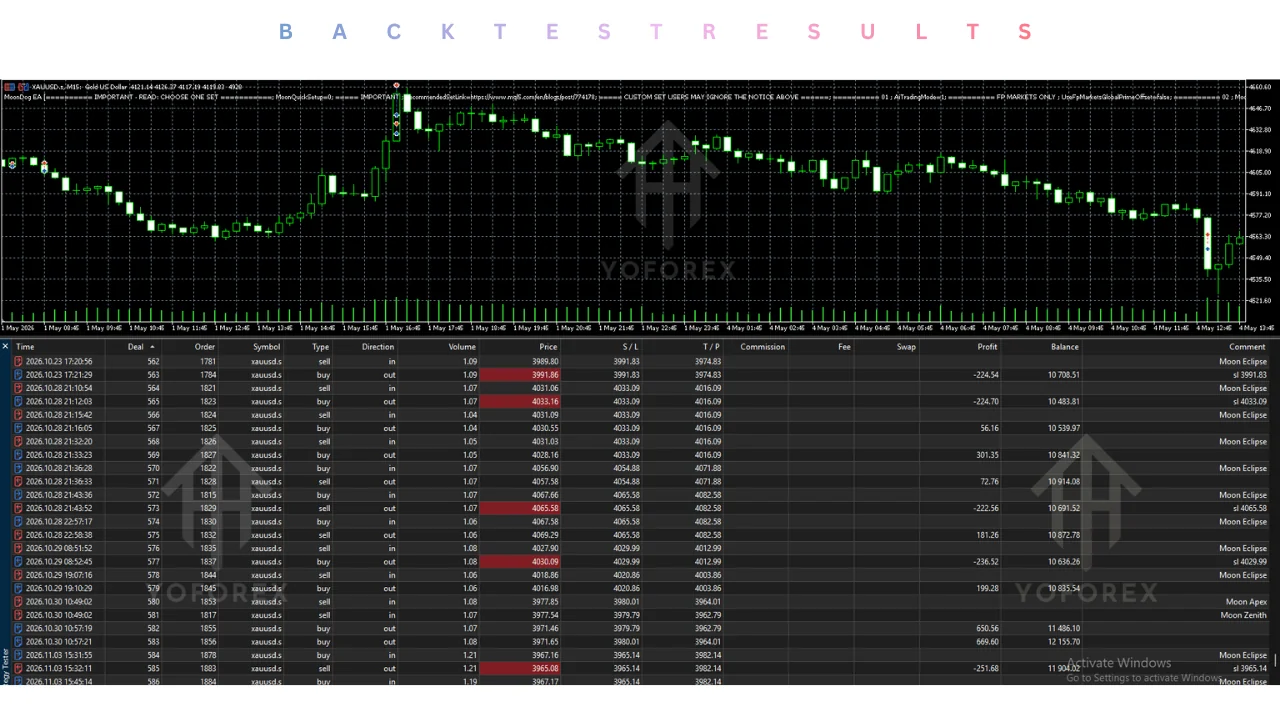
The modules share one chart but maintain separate identities, including magic numbers.
Trading Workflow
- Market condition: Modules monitor XAUUSD for breakout and expansion setups.
- Entry condition: Selected modules generate signals based on their individual logic.
- Trade execution: Pending Buy Stop or Sell Stop orders are placed when conditions are met.
- Position management: Each trade is managed independently with its own SL and TP.
- Risk control: MoonLock, news/weekend/spread filters and lot-sizing rules apply.
- Exit: Trade closes via SL, TP or protection rules.
- Automation: The process runs without continuous manual intervention once configured.
Exact internal calculations of each module are not fully public. Buyers should review the official product documentation and user guide for the latest details.
Quick Product Snapshot
| Feature | Details |
|---|---|
| Platform | MetaTrader 5 |
| Strategy | Multi-strategy breakout |
| Trading Style | Pending stop orders on XAUUSD |
| Pairs/Instruments | XAUUSD (Gold) |
| Timeframe | Single-chart operation (check SET files) |
| Entry Logic | Module-based breakout detection + optional ONNX filter |
| Exit Logic | Own SL/TP per trade + optional MoonLock |
| Risk Management | Fixed/% risk, news/weekend/spread filters, no recovery systems |
| Automation | Fully automated with dashboard controls |
| Best For | Traders seeking systematic XAUUSD breakout exposure without martingale or grid recovery |
Key Features Buyers Should Understand
Multi-module design
Five core strategies run by default; four more can be enabled. This allows different structural views of gold from one chart. Verify which modules you want active and how concurrent exposure is managed.
Pending stop entries
The EA places Buy Stop and Sell Stop orders rather than market orders at signal time. Check how your broker handles pending order placement, modification and cancellation on XAUUSD.
Independent SL and TP
Every position has its own stop loss and take profit. Default values are approximately 20 gold pips SL and 140–150 gold pips TP (adjustable). Confirm these match your risk preference.
MoonLock profit protection
Classic mode aims to protect around 50% of a recorded peak floating profit. Adaptive mode uses strategy-specific settings. It is not a learning system. Test how it behaves on your account.
Local ONNX options
Three modes exist: Conservative 2x (default), More Trades 2x, and Without ONNX. Models run inside MetaTrader 5. Compare results across modes during testing.
News, weekend and spread filters
Dedicated protection for NFP, CPI and FOMC, plus Weekend Shield and Spike Shield. These pause new entries and attempt to clear pending orders during protected windows. They do not automatically close open positions.
SET files and lot sizing
Four main SET configurations are supplied. They use fixed 0.01 lot. Without a SET file the EA’s AUTO sizing behaves differently between the Strategy Tester and live charts. Always verify lot size after loading a SET.
Why Traders May Consider This Trading Approach
Automated multi-module execution can apply the same rules consistently without emotional interference. Screen time is reduced after correct configuration. Position risk is defined at entry rather than escalated after losses. Filters for news and weekends add structure. Configurability through SET files and ONNX modes allows traders to match the system closer to their preferred activity level.
These points describe process advantages only. They do not imply any specific performance outcome.
Risks and Limitations Buyers Should Understand
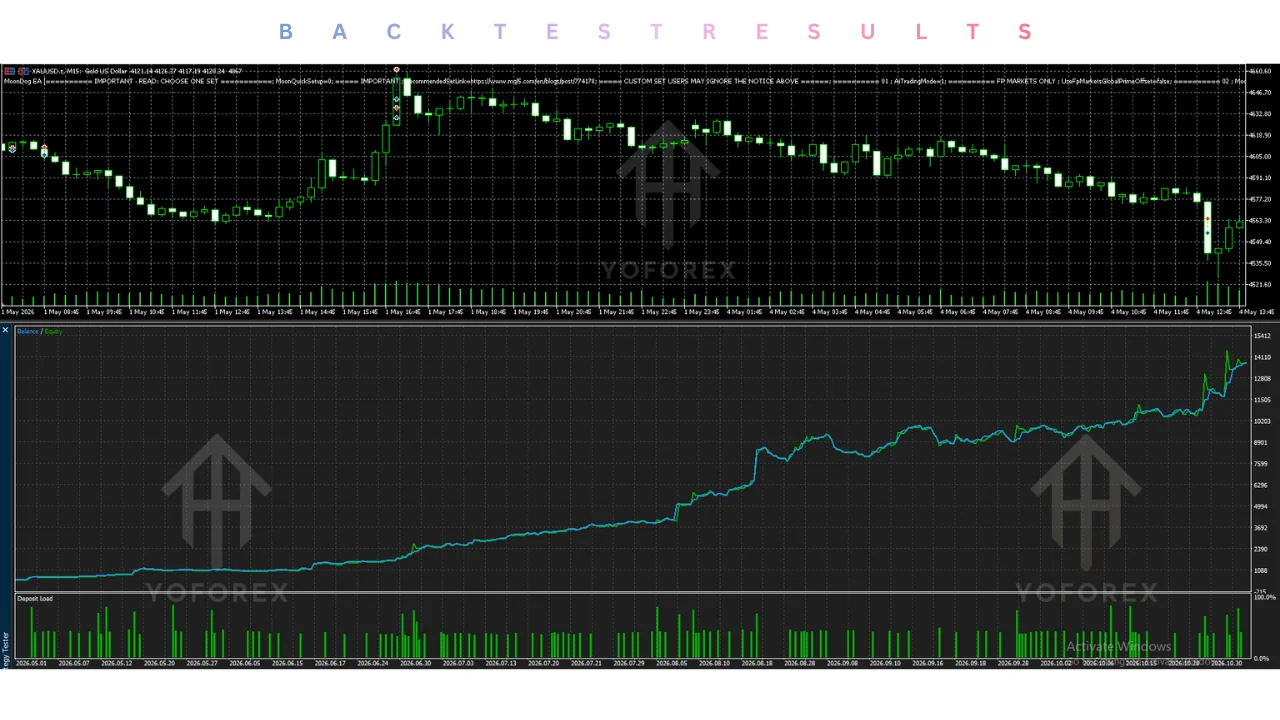
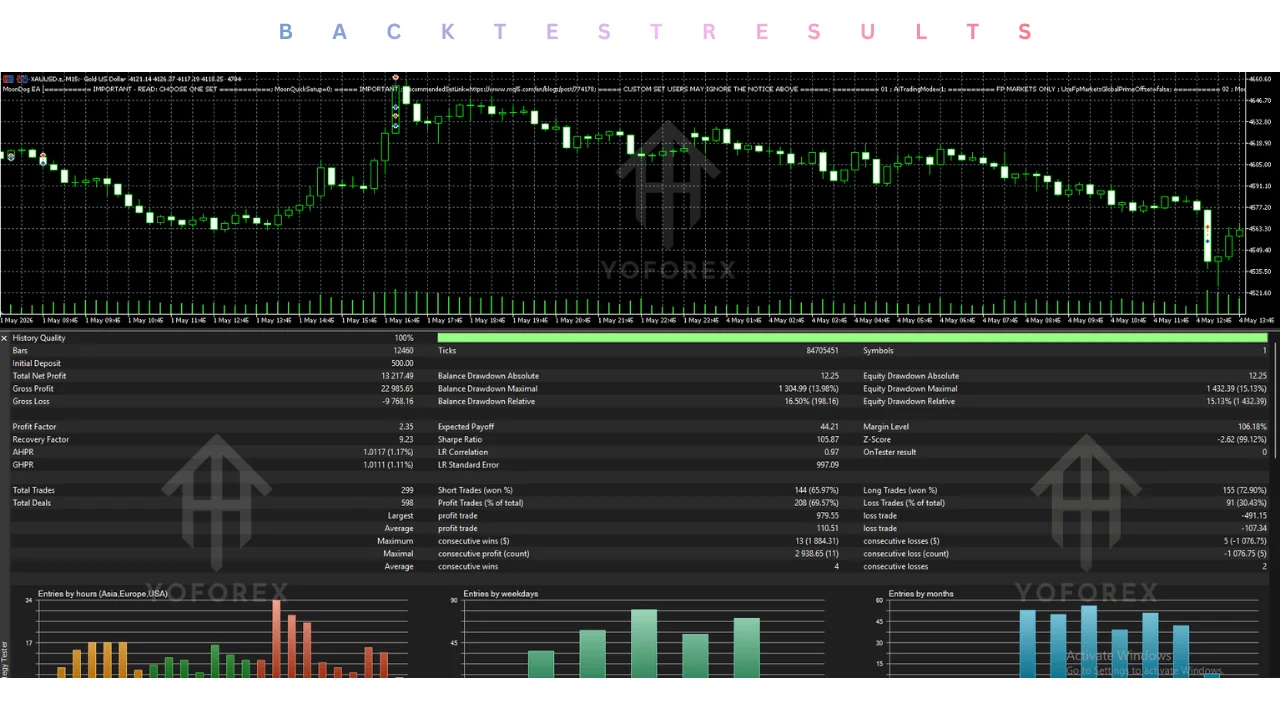
MoonDog is not a holy-grail system. Losing trades, drawdowns and quiet periods are expected. Gold breakouts are sensitive to spread, slippage and broker execution quality. Multiple active modules can increase simultaneous exposure. Backtests (even with real ticks) cannot fully reproduce live fills, cancellations or latency. Incorrect SET selection, lot size or ONNX mode will produce different results. VPS stability matters for virtual protection features. Historical signals or third-party results do not guarantee future performance.
Who Should Consider MoonDog EA?
Traders who prefer systematic XAUUSD breakout participation, accept defined risk per trade without recovery logic, and are willing to run proper demo tests. Users comfortable with pending-order behaviour and multi-module exposure may find the design relevant. Those who value local ONNX filtering and structured profit protection options may also consider it.
Who Should Avoid MoonDog EA?
Traders expecting guaranteed results or very low drawdown. Those unwilling to test thoroughly on demo. Traders who prefer aggressive recovery or martingale-style systems. Anyone uncomfortable with concurrent exposure from multiple modules. Users of platforms other than MetaTrader 5 or those who cannot accept gold volatility and execution variability.
Strategy-Based Buyer Checklist
Before purchasing, verify:
- Exact multi-module breakout approach matches your style
- Entry method (pending stops) works with your broker
- Exit rules (own SL/TP + MoonLock) suit your risk tolerance
- Risk model (fixed/%/adaptive) and concurrent exposure limits
- Expected drawdown behaviour under different market conditions
- MetaTrader 5 and XAUUSD symbol compatibility
- Broker execution quality for pending orders and gold spreads
- Confirmed instrument is XAUUSD only
- Timeframe and chart requirements in the user guide
- VPS needs for reliable protection features
- Correct SET file and ONNX mode
- Ability to run real-tick backtests
- Plan for extended demo testing
- Developer support and update process
How to Test MoonDog EA Before Live Trading
- Review the official product page and user guide.
- Confirm MetaTrader 5 and XAUUSD symbol settings with your broker.
- Install on a demo account and load a recommended SET.
- Test different ONNX modes and lot sizes under realistic conditions.
- Review order execution, slippage and pending-order behaviour.
- Monitor drawdown, concurrent positions and filter activation.
- Check broker conditions during news and weekend periods.
- Evaluate whether the overall behaviour matches your risk tolerance and monitoring capacity.
Never move to live trading until you understand how the system behaves on your specific setup.
Is MoonDog EA’s Approach Right for You?
The approach may suit traders who want multi-module XAUUSD breakout automation with defined risk per trade and no recovery systems. It requires acceptance of gold volatility, possible concurrent exposure, and the need for careful broker and settings testing.
It is less suitable if you need aggressive recovery methods, ultra-low risk expectations, or a system that works identically across all brokers without adjustment. Available capital, monitoring time and risk tolerance should guide the final decision. Balanced evaluation based on your own testing is essential.
Final Verdict
MoonDog EA V4.23 approaches XAUUSD trading through multiple independent breakout modules that place pending stop orders and manage each position with its own stop loss and take profit. Optional local ONNX filtering, MoonLock protection and news/weekend filters add structure. The design deliberately avoids recovery systems.
It may be worth considering if you specifically want this style of automated gold breakout participation and are prepared to test execution quality, concurrent exposure and settings thoroughly. Important limitations remain drawdown, broker dependency and the reality that past behaviour does not guarantee future results.
Review the strategy details, check your platform and broker compatibility, test the configuration on demo, and decide whether MoonDog EA fits your trading approach. View the bot on forexfactory.cc to check current details and next steps.
Support & Disclaimer
Support:
If you need help installing or configuring your EA, or face any kind of bug, feel free to reach out on:
Telegram Group: Join our community
Disclaimer:
Forex and gold trading involve risk. Past performance doesn’t guarantee future results. Always test robots on demo before live trading and use proper risk management.
REFERRAL
Join the VIP Signals Telegram Channel for real-time expert trading signals and stay ahead in the forex market. Get personalized strategies by becoming a part of our Real Account Management Telegram Channel and optimize your trading experience. If you’re aiming to Pass PropFirm Challenges , join our dedicated channel for tips and proven methods. Start managing your capital effectively with expert advice from our Funded Account Management Telegram Channel. For advanced traders, our HFT EA / Passing Telegram Channel offers high-frequency trading insights and strategies to boost your performance
Sources
- MoonDog EA V4.23 MT5-FREE DOWNLOAD — yoforex.org
- MoonDog EA V4.23 MT5 — yoforex.net