
CCI Speed Oscillator Indicator MT4: Supercharge Your Momentum Trading
Are you tired of late entries and whipsaw signals eating into your profits? The CCI Speed Oscillator Indicator MT4 could be the missing link in your Forex strategy. Built for MetaTrader 4, this custom momentum tool accelerates your ability to spot strong trends and reversals. Best of all, YoForex powers the free download directly on ForexFactory.cc—so you get professional-grade analysis without paying a cent. In this post, we’ll break down what the indicator does, how it’s calculated, and why it can transform your approach to trading. Ready to trade with confidence and precision? Let’s dive in.
What Is the CCI Speed Oscillator Indicator MT4?
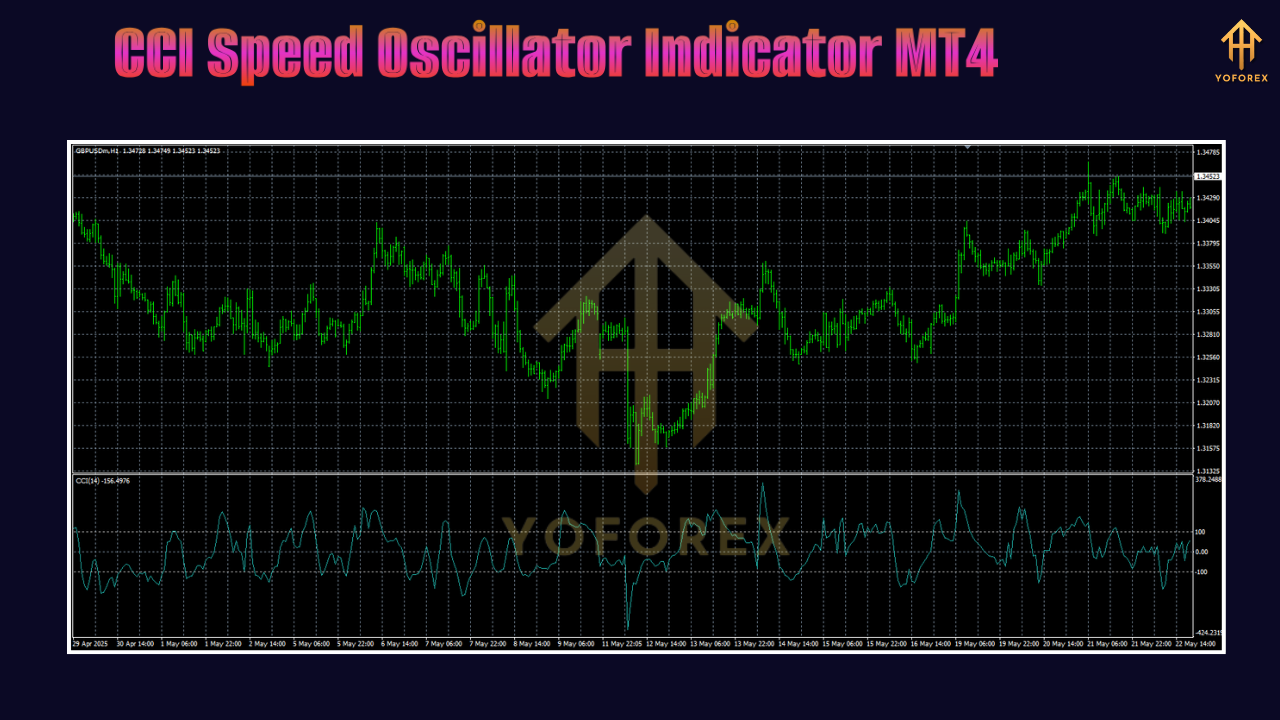
The CCI Speed Oscillator Indicator MT4 is a technical analysis tool derived from the classic Commodity Channel Index (CCI). Instead of simply measuring deviation from a moving average, it tracks the rate of change in CCI values over a set period. This “speed” element helps you see when momentum is accelerating or fading—often before price action confirms it. In practice, the indicator plots a histogram or line beneath your chart so you can gauge momentum strength in real time.
Whether you trade Forex majors or exotic pairs, the tool adapts seamlessly across all MT4-compatible brokers. It’s particularly useful for spotting breakouts and early reversals, since it highlights surges in buying or selling pressure that standard oscillators might miss.
How the CCI Speed Oscillator Is Calculated
Under the hood, the CCI Speed Oscillator MT4 follows a two-step process:
- Compute the standard CCI over your chosen look-back period (default is often 14).
- Measure the change in that CCI value over a second period (e.g., 5 bars).
By comparing how quickly the CCI swings, the indicator generates a momentum curve. When the histogram bars climb rapidly, momentum is picking up. When they flatten or reverse, the trend could be losing steam.
Because it builds on the familiar CCI formula, you get all the benefits of that indicator—like overbought/oversold readings—plus an extra layer that shows you how fast the market is moving.
Reading Signals and Interpretations
Using the CCI Speed Oscillator Indicator MT4 is straightforward once you know what to look for:
- Rising histogram above zero: Bullish momentum speeding up. Consider long entries.
- Falling histogram below zero: Bearish momentum accelerating. Look for shorts.
- Divergence: Price makes a new high but the oscillator doesn’t follow, hinting at a potential reversal.
- Crosses of the zero line: Simple buy/sell triggers when speed turns positive or negative.
Always confirm signals with price action or another tool—no indicator is perfect on its own. But pairing the speed oscillator with support/resistance levels or candlestick patterns can filter noise and boost your win rate.
Key Benefits of the CCI Speed Oscillator
• Early Momentum Detection – Spot acceleration before price confirms.
• Improved Entry Timing – Avoid chasing moves too late.
• Divergence Alerts – Catch hidden reversals with ease.
• Customizable Settings – Tweak CCI and speed periods to suit your style.
• Lightweight & Fast – No heavy CPU load; perfect for multi-chart setups.
These advantages make the CCI Speed Oscillator Indicator MT4 a go-to MT4 indicator for traders who value precision and speed.
Installation & Setup
- Download the indicator file (
CCI_Speed_Oscillator.ex4) from the ForexFactory Indicator Section. - Copy the
.ex4into your MT4Indicatorsfolder (e.g.,...\MetaTrader 4\MQL4\Indicators). - Restart MetaTrader 4 or refresh the Navigator panel.
- Drag & drop “CCI Speed Oscillator” onto your chart.
- Adjust inputs:
CCI Period (default: 14)
Speed Period (default: 5)
Apply to (Close, Typical Price, etc.)
For hands-on guidance, check out our Newest Indicators page or join the YoForex Telegram group for setup tips.
Chart Customization & Recommended Settings
Once attached:
- Colors: Choose contrasting hues for the histogram and zero line.
- Alerts: Enable pop-up or email alerts on zero-line crosses.
- Timeframes: Works on all, but M15–H1 often deliver balanced signals.
- Filter: Combine with a 200-period SMA to trade only in the direction of the larger trend.
Experiment with the speed period if you prefer either more sensitive readings (shorter period) or smoother curves (longer period).
Using the Indicator in Trending Markets
In strong trends, the CCI Speed Oscillator Indicator MT4 shines by highlighting bursts of momentum. When price is in a clear uptrend, wait for the histogram to dip toward zero and then rise again—this often marks a fresh leg higher. You can trail your stop once momentum slows (histogram peaks and rolls over). This method helps you ride the bulk of the trend and exit before major retracements.
Applying in Range-Bound Conditions
Even in choppy markets, the momentum “speed” can offer clues. Watch for repeated peaks near an upper threshold. If momentum fails to climb to prior highs, you may be in a reversal zone. Conversely, dips that stall above the lower threshold can signal strong support—and potential long entries. Always combine with horizontal support/resistance levels to avoid false breakouts.
Integrating Risk Management
No system is foolproof, so keep risk tight:
- Fixed Stop-Loss: Place just beyond recent swing high/low.
- Position Sizing: Use only 1–2% of your equity per trade.
- Trail Stops: Move stops to breakeven when the histogram peaks and turns.
By aligning risk with momentum changes, you protect capital and lock in profits effectively.
Backtesting & Optimization Tips
Before you run live, backtest on at least six months of data per currency pair. Check for:
- Win/Loss Ratio – Aim for 1:1 or better.
- Average Gain vs Loss – Look for larger average wins.
- Equity Curve Smoothness – Ensure consistent growth, not jagged spikes.
Adjust your CCI and speed periods to optimize performance per instrument—what works on EURUSD H1 may differ on GBPJPY M30.
Combining with Other YoForex Tools
Take momentum analysis further by pairing the CCI Speed Oscillator with YoForex’s other free indicators:
- Trend Strength Meter – to confirm trend direction.
- Volatility Breakout System – to time entries on big moves.
All these tools are powered by YoForex and available for free on ForexFactory.cc, making it easy to build a complete trading suite without subscription fees.
Why Choose a YoForex-Powered Indicator?
YoForex Corp is committed to delivering robust, back-tested indicators without hidden costs. Every tool:
- Comes with free lifetime updates.
- Is developed by a team of EA and indicator specialists.
- Includes transparent performance reports and community feedback.
We believe quality analysis shouldn’t cost traders an arm and a leg. Explore more at our About Us page and join thousands of traders using YoForex tools today.
Support & Further Resources
If you hit any snags installing or customizing the CCI Speed Oscillator Indicator MT4, our support team’s here to help:
- WhatsApp: https://wa.me/+443300272265
- Telegram Group: https://t.me/yoforexrobot
Conclusion
The CCI Speed Oscillator Indicator MT4 offers a fresh take on momentum trading. By measuring the rate of change in the classic CCI, it uncovers emerging trends and reversals faster than many standard tools. Installation is simple, customization is flexible, and risk management integrates seamlessly. Download it for free—courtesy of YoForex—on ForexFactory.cc and start fine-tuning your entries and exits. Demo-test the indicator over your favorite pairs, and watch how precise momentum analysis can sharpen your trading edge.


Comments
No comments yet. Be the first to comment!
Leave a Comment