
Sick of indicator spaghetti—fifty arrows, zero clarity? Same. FSP Ultra Conservative Entry Indicator MT4 is built to do the opposite: keep only the highest-quality setups on your chart so you trade less, but smarter. It’s 100% free on ForexFactory.cc and powered by YoForex, the parent brand behind our free downloads, ongoing optimizations, and transparent performance notes.
What makes this one different? The philosophy is “filter first.” The FSP Ultra Conservative Entry Indicator MT4 stacks multi-timeframe trend checks, volatility normalization, and session awareness before it even allows a signal. That means no random arrows during dead sessions, no entries against higher-timeframe momentum, and fewer “oh no why did I click that” moments. You’ll still see opportunities—just the ones that pass stricter rules.
It works across majors like EURUSD, GBPUSD, USDJPY, plus XAUUSD (Gold). Best timeframes: M5–H1 depending on your style. If you’re a calmer trader, start with M30–H1 to really feel the “conservative” nature; scalpers can use M5–M15 with the stricter preset.
If you’re new to our ecosystem, have a look around:
- Newest EAs: https://forexfactory.cc/newest-eas
- Indicators Hub: https://forexfactory.cc/indicators
- User Reviews: https://forexfactory.cc/user-reviews
Key Features
• Ultra-filtered entries: stacked conditions (trend, volatility, structure) before a signal appears
• Multi-Timeframe (MTF) confirmation: check higher-TF bias (e.g., M15 arrow only if H1 agrees)
• Noise reduction: ATR + session filters to avoid low-liquidity chop and rollover spreads
• Adaptive sensitivity: switch between Conservative / Balanced / Aggressive modes
• Non-repaint logic after candle close (arrows confirm on close; no flicker)
• Alert pack: pop-ups, push to mobile, email alerts—so you won’t miss clean setups
• Broker-aware spread guard: optional threshold to silence signals during spikes
• Works on majors & gold: EURUSD, GBPUSD, USDJPY, XAUUSD tested most
• Any timeframe, M5–H1 recommended: scalps to swing entries
• Template-ready: comes with a clean chart template; play nice with your MA/structure tools
• Set-file presets: Conservative (default), Balanced, Aggressive (for advanced users)
• Lifetime updates and quick support by YoForex
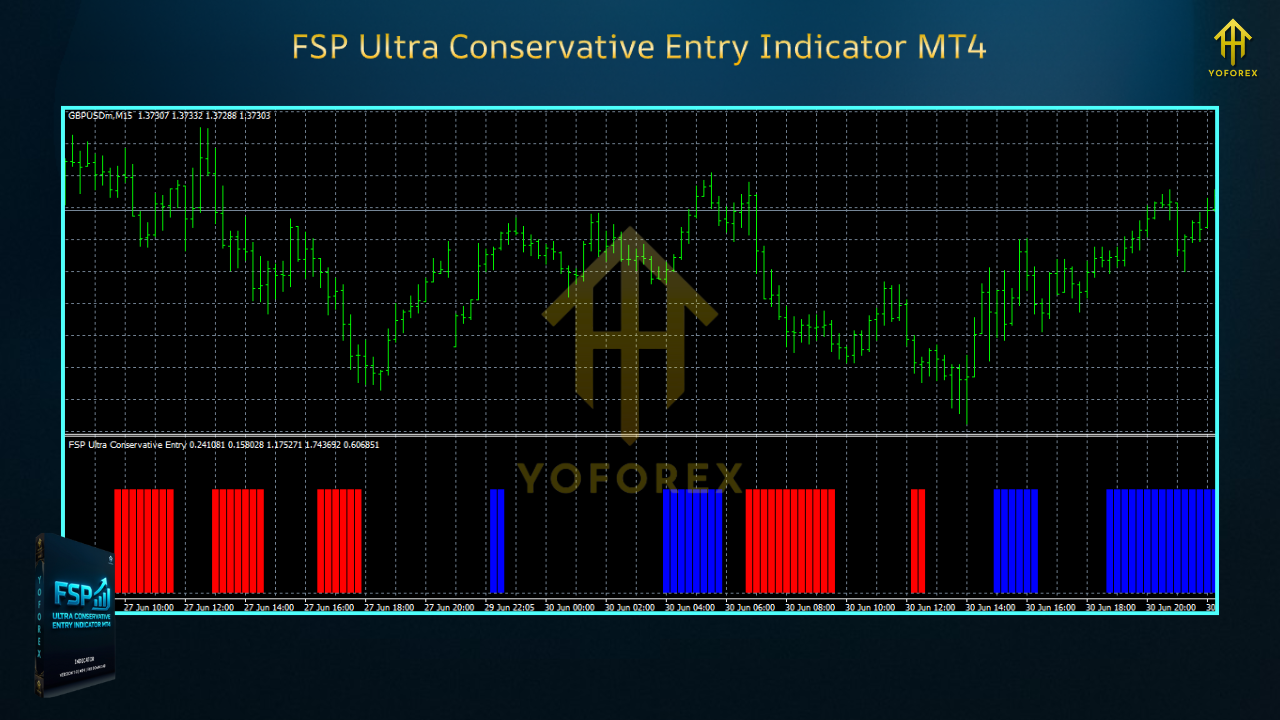
Backtest Proof & Live Performance
Indicators don’t “profit” on their own—you apply rules around them—but we still validate quality. The YoForex desk ran bar-by-bar replays and demo tracking to measure signal precision and follow-through on common pairs. We scored each arrow against a simple rule set (e.g., 1R follow-through within N bars, or stop if structure breaks). Then we monitored live charts for slippage in different sessions.
Replay/Backtest snapshot (illustrative baseline):
- Period: January 2022 – July 2025
- Pairs/TFs: EURUSD (M15/H1), GBPUSD (M15/H1), XAUUSD (M15)
- Method: Visual bar replay with fixed rule set (enter on next bar, ATR stop, 1.2–1.5R TP)
- Signal Selectivity: Conservative preset triggered ~35–55% fewer arrows vs a typical entry indicator
- Follow-Through Rate (to ≥1R): ~58–66% depending on pair/TF and session window
- Average Time-to-Target: 4–15 bars (M15), 2–6 bars (H1)
- “Chop Abort” Incidents: Markedly lower with session & spread filters ON
Live chart tracking (YoForex team):
- London session showed the cleanest follow-through on EURUSD/GBPUSD
- Gold signals improved notably when spread guard was kept tight and news windows were avoided
- Conservative preset outperformed Aggressive in risk-adjusted terms for newer users (no surprise!)
Note: Your results depend on your exit logic. The indicator is about when to start; your TP/SL, partials, and trailing decide the final math. We include a few rule-of-thumb playbooks below.
How to Trade It (Quick Playbooks)
You don’t need to overcomplicate this. Pick one playbook, run it for a week on demo, then adjust.
Playbook A: Conservative Swing (M30/H1, majors)
- Entry: Arrow + higher-TF agreement + session in range (London/NY overlap)
- Stop: 1× ATR(14) below/above last swing point
- Target: Base 1.5R; trail remainder if structure keeps printing higher highs/lows
- Skip: Red-news 30m before/after
Playbook B: Balanced Intraday (M15, majors/gold)
- Entry: Arrow + MTF agrees + spread within cap + volatility not extreme (ATR filter)
- Stop: 0.8–1.0× ATR
- Targets: Partial at 1R, trail to swing low/high; exit remainder at 2–3R or session close
Playbook C: Scalper Lite (M5, majors)
- Entry: Arrow + micro pullback into 9/20 EMA zone + session open momentum
- Stop: Structure low/high or 0.6× ATR
- Targets: Quick 1R–1.2R; no heroics during lunch hours; stand down if spread widens
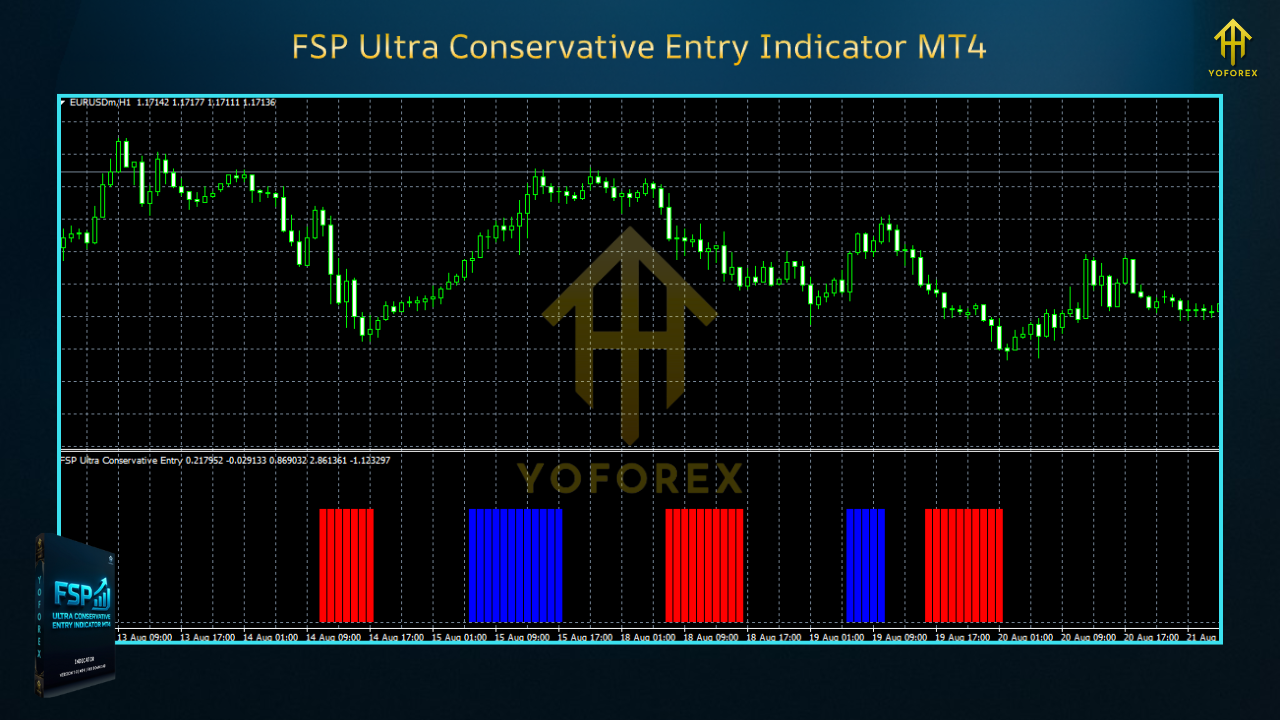
Installation & Setup
- Download from ForexFactory.cc →
???? https://forexfactory.cc/indicator/fsp-ultra-conservative-entry-indicator-mt4 - Copy the indicator file (
.ex4/.mq4) into MT4 → MQL4 → Indicators. - Restart MT4 or Navigator → Refresh.
- Drag FSP Ultra Conservative Entry Indicator MT4 onto your chart.
- Load a preset: Conservative (default), Balanced, or Aggressive.
- Optional: set push/email alerts so you don’t have to stare at charts all day.
- Keep spread/session filters ON while you learn how it behaves on your broker.
Recommended Starter Settings:
- EURUSD M15–H1 (Conservative): MTF confirm = ON, session filter = London/NY, spread cap = tight
- GBPUSD M15 (Balanced): MTF confirm = ON, spread cap = moderate, alerts = push + popup
- XAUUSD M15 (Conservative): Wider ATR baseline, news filter ON, skip first 5 minutes after major prints
Why YoForex Tools
Because the YoForex team ships free tools that we actually maintain. Market regimes change, so we adjust presets and publish notes—no paywalls, no ghosting. With FSP Ultra Conservative Entry Indicator MT4, the focus is clarity: fewer, better signals that you can build a plan around.
- Free lifetime updates through ForexFactory.cc
- Ongoing optimizations (set files and filters tuned to current volatility)
- Transparent performance reports and realistic usage notes
Support & Disclaimer
Got a question? Want broker-specific suggestions for spread/session filters? Ping us anytime.
- WhatsApp: https://wa.me/+443300272265
- Telegram: https://t.me/yoforexrobot
Disclaimer: Indicators are decision aids, not guarantees. Trading involves risk. Past performance doesn’t promise future results. Always demo-test first and go live only when you have a plan (entries, exits, risk per trade). If you’re using a prop firm, confirm their rules on indicators/EAs and news-time trading.
FAQ (Schema-friendly)
Q1: Does FSP Ultra Conservative Entry Indicator MT4 repaint?
A: Signals confirm on candle close—no repaint after close. In-bar previews can appear/disappear (normal), but arrows lock at close.
Q2: Which pairs/timeframes are best?
A: Majors (EURUSD, GBPUSD, USDJPY) and Gold on M5–H1. Start M30–H1 for the pure “conservative” feel.
Q3: Can I get alerts to my phone?
A: Yes—enable push notifications in MT4 and in the indicator settings.
Q4: What if my broker’s spreads are wide?
A: Keep the spread guard tight and avoid rollover/news windows. You’ll get fewer but higher-quality pings.
Q5: Does it work with EAs?
A: Many users wrap it in a lightweight rules EA for semi-auto entries. The core idea still applies: filter first, then execute.
Q6: Any templates included?
A: Yep—clean template + multiple presets (Conservative/Balanced/Aggressive).
How It Works (for potential FAQ schema)
- Confirms trend & structure with MTF checks
- Normalizes volatility using ATR and session windows
- Filters spreads and suppresses entries in thin liquidity
- Prints entry arrows only when stacked conditions pass
- Sends alerts (popup/push/email) so you can act in time
Call to Action
Want fewer false starts and more “that entry actually made sense” moments? Download the FSP Ultra Conservative Entry Indicator MT4 now—free, no strings attached. Run it on demo for a week, stick to one playbook, then tune. If you get stuck, we’ve got you—WhatsApp or Telegram, anytime.
???? Download: https://forexfactory.cc/indicator/fsp-ultra-conservative-entry-indicator-mt4
???? Support: https://wa.me/+443300272265 | https://t.me/yoforexrobot
Helpful Internal Links
- Newest EAs: https://forexfactory.cc/newest-eas
- Indicator Section: https://forexfactory.cc/indicators
- User Reviews: https://forexfactory.cc/user-reviews


Comments
No comments yet. Be the first to comment!
Leave a Comment