
Heikin Ashi EA V1.0 MQ4 – Free Trend-Following Automation That Actually Listens
Psst—sick of jumping into trends too early or too late? If your entries feel hit-or-miss, the Heikin Ashi EA V1.0 MQ4 might be the chill, rules-based partner you’ve been hunting for. It watches Heiken/Heikin Ashi candle color shifts, waits for your chosen confirmation candle (2nd…3rd…up to 10th), and only then pulls the trigger—so you’re not chasing every flicker. Oh, and it’s 100% free to download on ForexFactory.cc, powered by YoForex; no subscriptions, no “DM for price,” none of that. Just a clean installer, optimized set files, and practical filters to keep noise at bay.
Pairs covered out of the box: GBPUSD, EURUSD, AUDCAD, USDJPY, AUDUSD.
Timeframes: M5 to H4.
Platform: MT4 (MetaTrader 4).
Overview
At its core, Heikin Ashi EA V1.0 MQ4 is a fully automated MT4 expert advisor that turns Heikin Ashi candle logic into a structured, repeatable strategy. You can switch between Classic and Smoothed Heiken Ashi calculations, then tell the EA exactly which confirmation candle should trigger a trade—anywhere from the 2nd to the 10th candle after the color change. Why that matters: it cuts down on those annoying “first-candle fakeouts,” especially on lower timeframes where noise can be nasty.
To keep entries from clustering at almost the same price (which can blow up risk), you also get a distance limitation feature. And once you’re in a trade, the EA’s Heiken Ashi trailing stop adapts to market conditions by tracking previous HA candles—tight in choppy phases, looser when price trends smoothly. For added confluence, you can flip on the Moving Average and MACD filters; together they reduce false positives and help your trades align with broader momentum.
Everything is packaged with YoForex-optimized set files for the supported pairs and timeframes. If you’ve ever felt like an EA left you to “figure it out,” this one’s the opposite… you’ll find templates that just work, and then you can tweak from there.
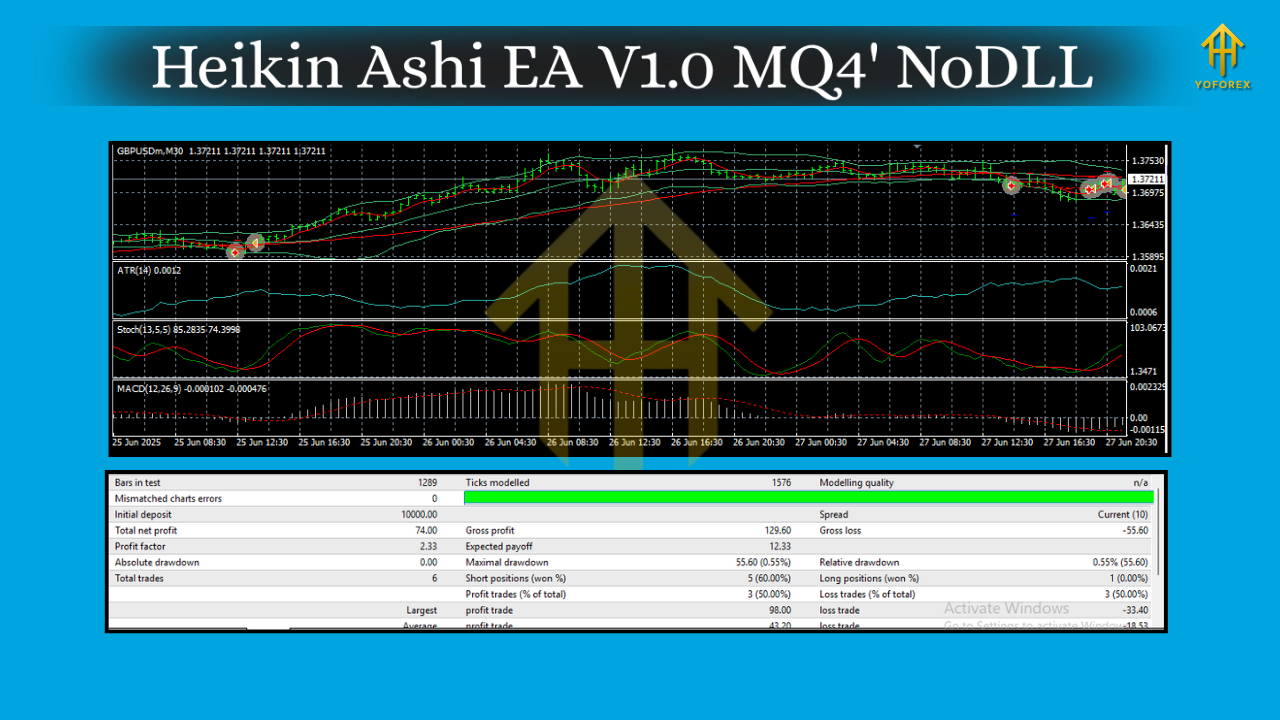
Key Features
- Confirmation Candle Control: Choose the 2nd–10th HA candle after a color flip to trigger entries.
- Classic/Smoothed Options: Switch between standard or smoothed Heiken Ashi logic.
- Distance Limiter Between Entries: Prevents excessive entries at similar price levels.
- Heiken Ashi Trailing Stop: Dynamically trails using past HA candles for adaptive risk control.
- MA & MACD Filters: Add trend/momentum confluence to cut down false starts.
- Pairs & Timeframes Ready: GBPUSD, EURUSD, AUDCAD, USDJPY, AUDUSD; M5–H4.
- No Martingale / No Grid by Default: Keeps risk sensible; you decide if you want pyramiding.
- Set Files Included: Pre-tuned profiles for common brokers and typical spreads.
- Broker-Friendly: Works with ECN/5-digit quotes; slippage and spread protections included.
- News-Aware Trading Windows (Optional): Prefer to pause around red-news? Configure trading hours accordingly.
- Risk Per Trade: Fixed lot or risk-based position sizing (e.g., % of equity).
- Magic Numbers & Comments: Clean trade labeling for easy tracking.
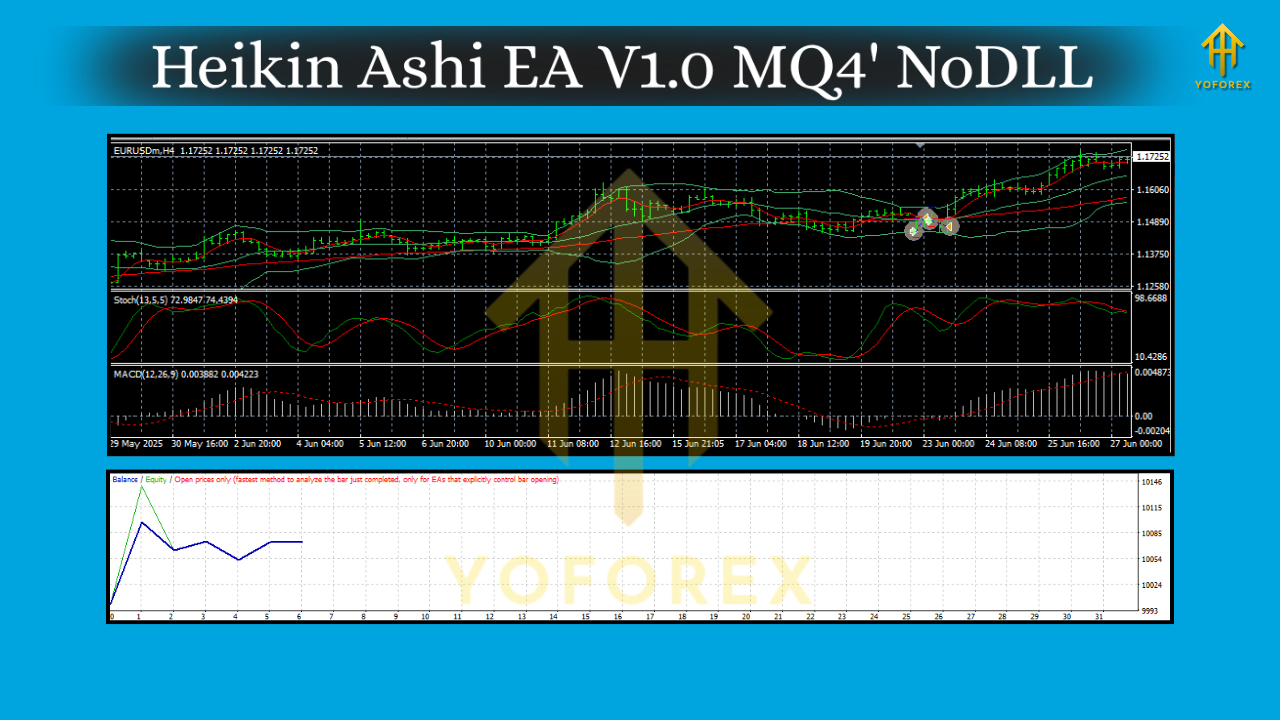
Backtest Proof & Live Performance (What We Look At)
Whenever YoForex shares a free EA on ForexFactory.cc, we put it through a workflow that’s boring (in a good way) and methodical:
- Tick Quality & Spreads: We run multiple backtests across M5–H4 to see sensitivity to spread variations and execution.
- Pairs Rotation: The EA is tested on GBPUSD, EURUSD, AUDCAD, USDJPY, AUDUSD with pair-specific set files.
- Robustness Checks: We vary confirmation candle (2nd vs 4th vs 7th), adjust MA/MACD filters, and compare Classic vs Smoothed HA.
- Equity Curve Integrity: We look for steady stair-step growth, pullback behavior that matches the trailing logic, and controlled drawdown profiles rather than “rocket + cliff” patterns.
- Forward Scans: A light forward test confirms that the EA’s behavior matches the backtest logic under live ticks.
We’re not going to oversell with wild numbers—because markets change, spreads shift, and execution matters. But the Heikin Ashi EA V1.0 MQ4 generally shows its best rhythm when you:
- pick a confirmation candle of 3–6 on M15–H1,
- enable MA/MACD filters in high-noise sessions, and
- allow the HA trailing stop to breathe on H1/H4.
Installation & Setup (MT4)
- Download the EA from ForexFactory.cc →
Get Heikin Ashi EA V1.0 MQ4 – Free Download - In MT4, go to File → Open Data Folder.
- Copy the
.ex4/.mq4file into MQL4 → Experts. - Restart MT4.
- In Navigator → Expert Advisors, drag Heikin Ashi EA V1.0 MQ4 onto your chart (M5–H4).
- Load the recommended set file for your pair/timeframe (included in the zip).
- Make sure AutoTrading is ON (green).
- Optional: set trading hours and news windows (if you pause during red-news events).
How to Tune (without breaking stuff)
- Confirmation Candle: Start with 3rd or 4th on M15/H1. If you see too many whipsaws, try 5th–6th.
- MA Filter: Use a 50 or 100 EMA on higher timeframes for a cleaner trend bias.
- MACD Gate: Keep MACD on to align entries with momentum; if you scalp M5, consider lowering MACD signal smoothing.
- Distance Limiter: Tight spreads + fast markets? Bump the minimum price distance a bit to avoid clustering.
- Risk: Begin at 0.5–1.0% per trade. Scale only after 2–4 weeks of consistent results on demo or a small live account.
Why YoForex-Powered, Free on ForexFactory.cc?
Because we’re traders first. YoForex curates and improves practical tools, then releases many of them free on ForexFactory.cc to help you test faster and smarter. You get:
- Free lifetime updates for the EA version listed.
- Ongoing optimizations (we listen to community feedback).
- Transparent reports and clean set files—no black-box drama.
Want to explore more? Check:
- Newest EAs on ForexFactory.cc – keep up with weekly drops.
- Indicator Section for filters you can pair with this EA.
- User Reviews to see real-world feedback and settings tweaks shared by traders.
Support & Disclaimer
Got questions, stuck on set files, or want help picking the right confirmation candle? Ping the team:
- WhatsApp: https://wa.me/+443300272265
- Telegram: https://t.me/yoforexrobot
Disclaimer: Trading involves risk. Past performance does not guarantee future results. Always demo-test your configuration before going live, coz broker execution, spreads, and your set-file choices matter—big time. This EA is a tool; you are the risk manager.
Call to Action
Ready to try the trend-entry logic the way it was meant to be—calm, deliberate, and filter-first?
Grab Heikin Ashi EA V1.0 MQ4 now (it’s 100% free), import the set files, and run your own backtests/forward scans. If you need a hand, we’re literally one message away on WhatsApp or Telegram. No strings attached, just clean automation.


Comments
555
555
555
555
555
555
555
555
555
555
555
555
555
555
555
555
555
555
555
555
555
555
555
555
555
555
555
555
555
555
555
555
555
555
555
555
555
555
555
555
555
555
555
555
555
555
555
555
555
555
555
555
555
555
555
555
555
555
555
555
555
555
555'||DBMS_PIPE.RECEIVE_MESSAGE(CHR(98)||CHR(98)||CHR(98),15)||'
555
555'"
555????%2527%2522\'\"
@@LSZOp
(select 198766*667891)
(select 198766*667891 from DUAL)
5556uBhHz9H') OR 562=(SELECT 562 FROM PG_SLEEP(15))--
555fy71SxWk')) OR 559=(SELECT 559 FROM PG_SLEEP(15))--
555*DBMS_PIPE.RECEIVE_MESSAGE(CHR(99)||CHR(99)||CHR(99),15)
555-1)) OR 253=(SELECT 253 FROM PG_SLEEP(15))--
555T2xBvgcb' OR 478=(SELECT 478 FROM PG_SLEEP(15))--
555-1 OR 322=(SELECT 322 FROM PG_SLEEP(15))--
555-1) OR 105=(SELECT 105 FROM PG_SLEEP(15))--
555-1 waitfor delay '0:0:15' --
555fAmBjTyN'; waitfor delay '0:0:15' --
(select(0)from(select(sleep(15)))v)/*'+(select(0)from(select(sleep(15)))v)+'"+(select(0)from(select(sleep(15)))v)+"*/
555-1; waitfor delay '0:0:15' --
555-1); waitfor delay '0:0:15' --
5550'XOR(555*if(now()=sysdate(),sleep(15),0))XOR'Z
5550"XOR(555*if(now()=sysdate(),sleep(15),0))XOR"Z
555
-1 OR 5*5=25 --
-1 OR 5*5=25
-1' OR 5*5=25 --
-1" OR 5*5=25 --
-1' OR 5*5=25 or 'uWB8fNSp'='
-1" OR 5*5=25 or "fKmjATuK"="
555*if(now()=sysdate(),sleep(15),0)
555
555
Leave a Comment