
Mastering the Hull Suite Indicator V1.82 MT5: A Comprehensive Guide for Traders
In the dynamic world of forex and CFD trading, having the right technical indicators can make all the difference between profitable trades and missed opportunities. The Hull Suite Indicator V1.86 for MetaTrader 5 (MT5) has emerged as a powerful tool for traders seeking to enhance their technical analysis capabilities. This comprehensive guide will walk you through everything you need to know about this advanced indicator, from its fundamental principles to practical trading strategies.
Understanding the Hull Suite Indicator
The Hull Suite Indicator V1.86 is an advanced technical analysis tool designed specifically for the MT5 trading platform. At its core, this indicator is based on the Hull Moving Average (HMA), developed by Alan Hull. Unlike traditional moving averages, the HMA aims to eliminate lag while maintaining smoothness, providing traders with more responsive trend signals.
The suite version (V1.86) includes not just the basic HMA but additional complementary indicators that work together to create a comprehensive trading system. This multi-faceted approach allows traders to analyze market conditions from multiple perspectives, increasing the probability of accurate predictions.
The Science Behind the Hull Moving Average
- To truly appreciate the Hull Suite Indicator, it's essential to understand the mathematical foundation of the Hull Moving Average. Traditional moving averages calculate the average price over a specified period, but they often suffer from lag, meaning they react slowly to price changes.
- Alan Hull developed the HMA using weighted moving averages and square roots to address this lag issue. The formula involves calculating two weighted moving averages, taking their difference, and then applying another weighted moving average to this difference. The final step involves taking the square root of the period length to determine the smoothing factor.
- This complex mathematical approach results in an indicator that responds quickly to price changes while maintaining the smoothness that traders expect from moving averages. The reduced lag makes the HMA particularly effective for identifying trend changes and potential entry and exit points.
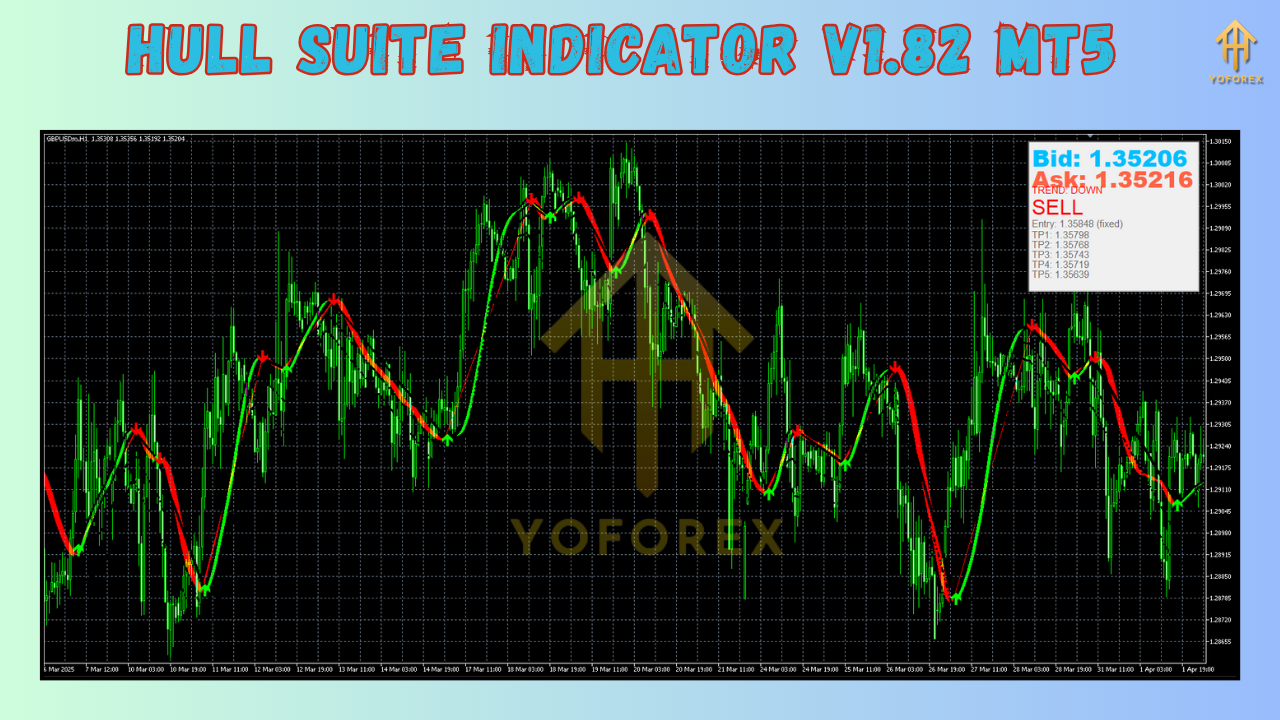
Key Features
The Hull Suite Indicator V1.86 for MT5 offers several features that set it apart from other technical indicators:
- Multiple Hull-based Indicators: The suite includes various Hull-based indicators such as Hull Moving Average, Hull Momentum, and Hull Oscillator, providing a comprehensive view of market dynamics.
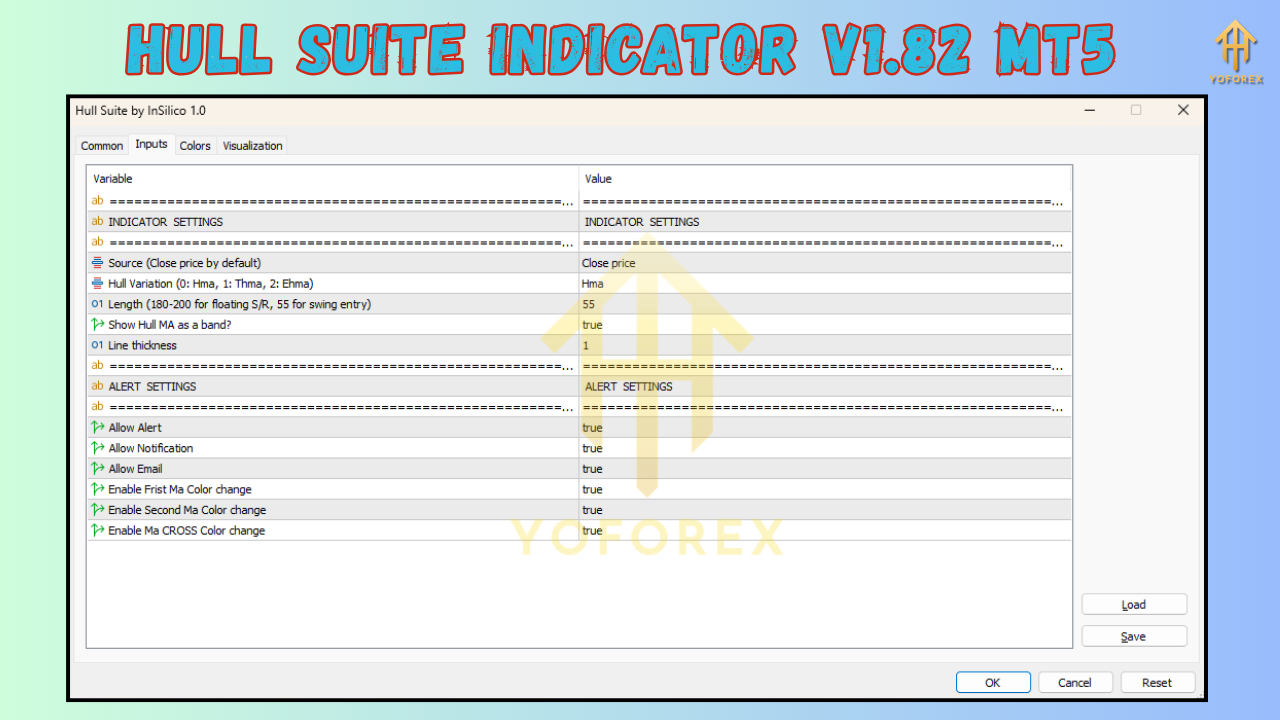
- Customizable Parameters: Traders can adjust the period settings, colors, and alert preferences to suit their trading style and preferences.
- Alert System: The indicator includes customizable alerts for potential trading opportunities, allowing traders to stay informed even when they're away from their screens.
- Multi-timeframe Analysis: The Hull Suite can display information across multiple timeframes, helping traders identify confluence between different market cycles.
- Visual Clarity: With clear visual signals and color-coded indicators, the suite makes it easy to identify potential trading opportunities at a glance.
Installation and Setup Process
Installing the Hull Suite Indicator V1.86 on your MT5 platform is a straightforward process:
- Download the indicator files from a reputable source.
- Open your MT5 platform and navigate to the "Data Folder" through the File menu.
- In the Data Folder, locate the "MQL5" folder and then the "Indicators" subfolder.
- Copy the Hull Suite indicator files into the Indicators folder.
- Restart your MT5 platform or refresh the indicators list in the Navigator window.
- Drag and drop the indicator onto your desired chart or apply it through the "Indicators" list.
Once installed, you can customize the indicator settings by right-clicking on the chart, selecting "Indicators," and choosing the Hull Suite. From there, you can adjust parameters such as the period length, color schemes, and alert settings to match your trading preferences.
Using the Hull Suite Indicator for Trading
The Hull Suite Indicator V1.86 can be applied to various trading strategies. Here are some common approaches:
Trend Following Strategy
The primary use of the Hull Suite is for trend identification. When the Hull Moving Average is sloping upward, it indicates an uptrend, while a downward slope suggests a downtrend. Traders can enter positions in the direction of the trend when the price is consistently above (for long positions) or below (for short positions) the HMA line.
Crossover Strategy
The Hull Suite excels at identifying potential trend changes through crossovers. When a shorter-period Hull Moving Average crosses above a longer-period one, it may signal the beginning of an uptrend. Conversely, when the shorter-period HMA crosses below the longer-period one, it may indicate the start of a downtrend.
Divergence Strategy
Divergence occurs when the price moves in one direction while the Hull Suite indicator moves in the opposite direction. This can signal potential trend reversals. Bullish divergence (price makes lower lows while the indicator makes higher lows) may indicate an upcoming uptrend, while bearish divergence (price makes higher highs while the indicator makes lower highs) may suggest a forthcoming downtrend.
Advanced Trading Strategies with Hull Suite
Beyond basic applications, experienced traders can develop more sophisticated strategies using the Hull Suite Indicator:
Hull Suite with Support and Resistance
Combining the Hull Suite with key support and resistance levels can enhance trading accuracy. When the HMA approaches a significant support level during an uptrend or a resistance level during a downtrend, it may indicate potential reversal points.
Hull Suite with Volume Indicators
Adding volume indicators to the Hull Suite can provide confirmation for trading signals. For example, a bullish Hull crossover accompanied by increasing volume strengthens the validity of the signal, while a crossover on low volume may be less reliable.
Hull Suite with Fibonacci Retracement
Using Fibonacci retracement levels in conjunction with the Hull Suite can help identify precise entry and exit points. Traders can look for Hull crossovers or divergences near key Fibonacci levels (38.2%, 50%, 61.8%) for high-probability trading opportunities.
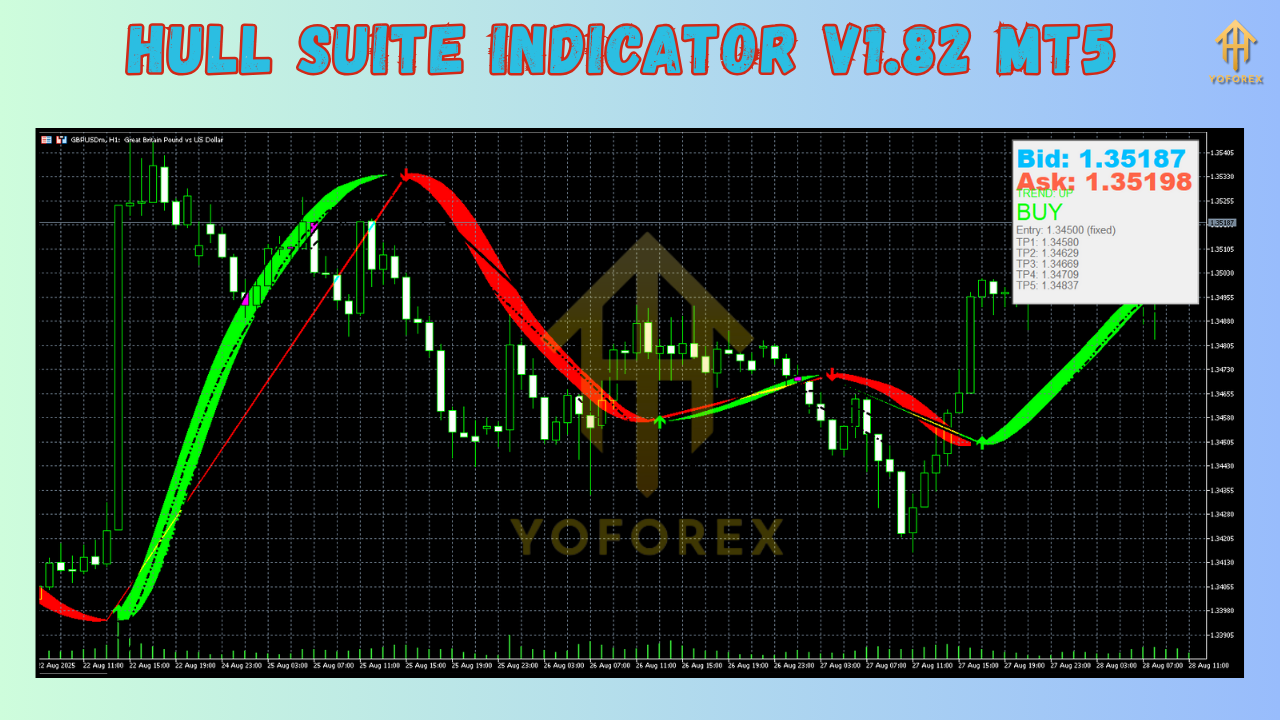
Advantages
The Hull Suite V1.86 offers several advantages over traditional indicators:
- Reduced Lag: The Hull Moving Average's mathematical construction minimizes lag, providing more timely signals.
- Versatility: The suite includes multiple indicators that can be used individually or in combination for various trading strategies.
- Customization: Extensive customization options allow traders to adapt the indicator to their specific needs.
- Clear Visual Signals: The indicator's visual design makes it easy to interpret signals quickly.
- Multi-timeframe Analysis: The ability to analyze multiple timeframes helps traders identify confluence and strengthen their analysis.
Limitations and Considerations
While the Hull Suite Indicator is a powerful tool, traders should be aware of its limitations:
- False Signals: Like all indicators, the Hull Suite can produce false signals, especially in ranging markets.
- Not a Standalone System: For optimal results, the Hull Suite should be used in conjunction with other forms of analysis.
- Requires Practice: Mastering the indicator and developing effective strategies takes time and experience.
- Market Conditions: The indicator's effectiveness may vary depending on market conditions and volatility.
Tips for Effective Use
To maximize the effectiveness of the Hull Suite Indicator V1.86:
- Start with a Demo Account: Practice with the indicator on a demo account before implementing it in live trading.
- Combine with Other Indicators: Use the Hull Suite alongside other indicators like RSI, MACD, or Bollinger Bands for confirmation.
- Adjust Settings for Different Assets: Optimize the indicator settings for different trading instruments and timeframes.
- Keep a Trading Journal: Record your trades and analyze the performance of the Hull Suite in different market conditions.
- Stay Updated: Keep track of updates and new versions of the indicator to benefit from improvements and new features.
Conclusion
The Hull Suite Indicator V1.86 for MT5 represents a sophisticated tool for traders looking to enhance their technical analysis capabilities. Based on the mathematically advanced Hull Moving Average, this suite provides responsive signals with reduced lag compared to traditional moving averages.
By understanding the underlying principles, mastering the various features, and developing appropriate strategies, traders can leverage the Hull Suite to identify potential trading opportunities with greater accuracy. However, as with any technical indicator, success requires practice, patience, and a comprehensive approach to market analysis.
Whether you're a beginner looking to improve your trading skills or an experienced trader seeking to refine your strategies, the Hull Suite Indicator V1.86 offers valuable insights that can complement your trading approach. As with all trading tools, remember to manage your risk carefully and never rely solely on any single indicator for your trading decisions.
Support & Disclaimer
Got questions or need help? Reach out anytime:
- WhatsApp: https://wa.me/+443300272265
- Telegram: https://t.me/yoforexrobot
Disclaimer: Past performance is no guarantee of future results. All trading carries risk. Always demo-test the Hull Suite Indicator V1.82 MT5 in a risk-free environment before deploying on a live account.


Comments
No comments yet. Be the first to comment!
Leave a Comment