
Master Trend Momentum with Snake CCI Indicator MT4
Introduction
Ever find yourself staring at the chart, wondering why some indicators just don’t cut it? You’re not alone. Too many lag behind, repaint signals or clog your screen with noise… and that’s exactly why the Snake CCI Indicator MT4 was born. Powered by YoForex and available 100% free on ForexFactory.cc, this custom MT4 indicator brings clarity to trend and momentum, so you can finally trade with confidence. No more guessing, no more repaint woes—just clean, reliable signals that help you surf the market’s waves rather than get wiped out. Ready to see how a simple twist on the classic CCI can transform your setups? Let’s dive in.
What Is the Snake CCI Indicator MT4?
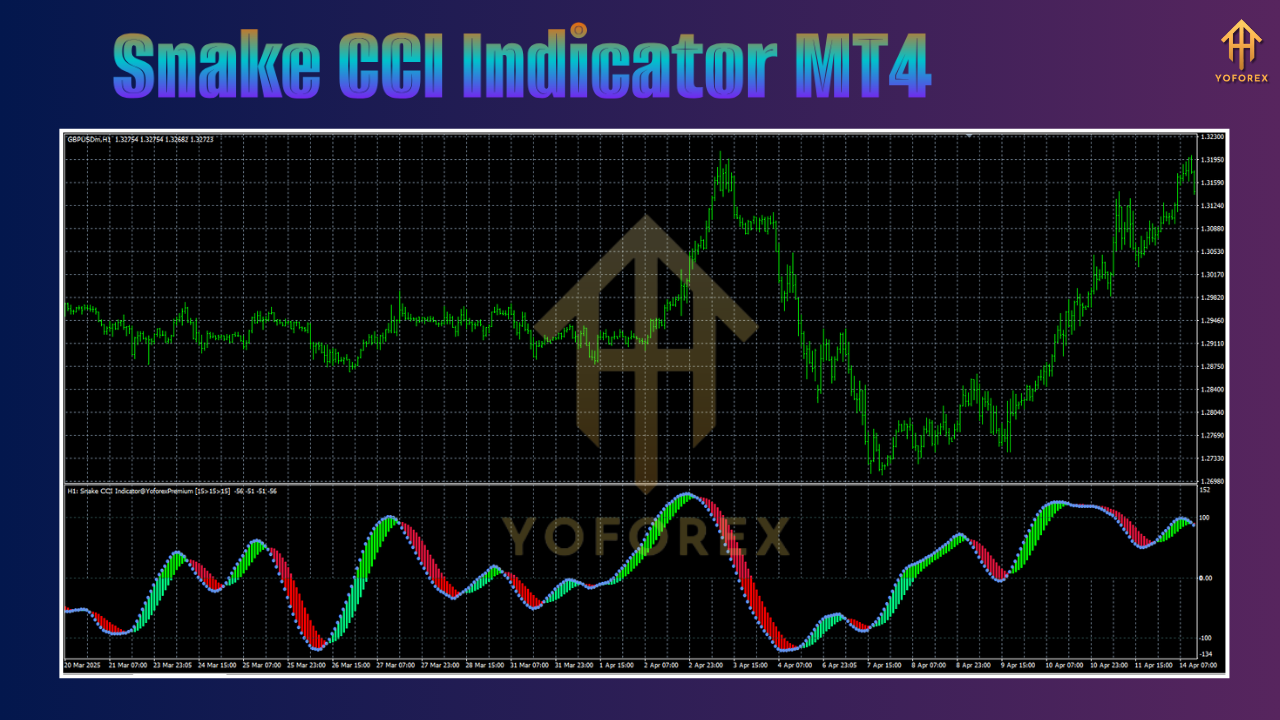
At its core, the Snake CCI Indicator MT4 is a refined take on the Commodity Channel Index. Instead of a single CCI line, you get multiple CCI bands—fast, medium, and slow—woven together like a snake, hence the name. When these bands align, they paint a clear picture of market momentum: entry, trend confirmation, and exit signals all in one. YoForex’s team has back-tested it across major pairs and gold, and they’ve run it live with consistent results. It’s non-repainting, lightweight on your CPU, and plays nicely with any timeframe. Whether you’re scalping on M5 or swing-trading on H4, this MT4 custom indicator adapts to your style, helping you spot high-probability moves with minimal lag.
Key Features of Snake CCI Indicator MT4
• Multi-band CCI design for clearer momentum signals
• Non-repainting logic—what you see is what you get
• Works on all timeframes: M1 through D1
• Compatible with all major currency pairs & gold
• Adjustable CCI periods for fine-tuning your edge
• Custom alert options: pop-up, email, push notifications
• Lightweight code—zero impact on terminal performance
• Built-in trend filter to avoid false breakouts
• Fully customizable colors and line thickness
• Free lifetime updates via YoForex on ForexFactory.cc
How It Works
The genius of the Snake CCI Indicator MT4 lies in its layered approach. Instead of a lone CCI histogram, imagine three snakes slithering together—each representing a different lookback period. When all three weave in the same direction, you’ve got a powerful trend underway. Here’s the breakdown:
- Fast CCI (short period) catches early momentum swings.
- Medium CCI (intermediate period) confirms if that initial move has teeth.
- Slow CCI (long period) determines if the bigger trend is supporting the shorter impulses.
When the fast snake crosses above the medium and slow snakes, you get a buy alert; cross below, you get a sell alert. And because it’s non-repainting, those signals stick, letting you set your entries, stop-loss and take-profit without second-guessing. Many indicators repaint—altering past signals as new bars form—but this one holds its signals firm. Plus, with YoForex’s trend filter built in, it ignores choppy zones, so you’re not riding every little wiggle. The result? Cleaner entries, fewer whipsaws, and a real shot at staying in trends long enough to rack up pips.
Installation & Setup Guide
Getting started is a breeze—no rocket science here.
- Download the Snake CCI Indicator MT4 for free from ForexFactory.cc via this direct link.
- Unzip the downloaded file; you’ll see
SnakeCCI.ex4. - Copy
SnakeCCI.ex4into your MT4’sIndicatorsfolder (File → Open Data Folder → MQL4 → Indicators). - Restart MT4 so it recognizes the new indicator.
- Attach the Snake CCI Indicator MT4 to your chart: open the Navigator panel (Ctrl+N), find “Snake CCI,” then drag it onto an EURUSD M15 chart—or your favorite pair/timeframe.
- Import Settings: for a quick start, use the recommended settings: Fast Period = 14, Medium = 28, Slow = 56, Trend Filter = true. You can tweak periods to fit your style—swing, scalp, whatever.
- Alerts: enable pop-up and push-notifications so you never miss a fresh signal, even when you’re away from your desk.
And that’s it—you’re ready to ride those momentum waves.
Optimizing Your Strategy with Snake CCI
Once you’ve got it installed, here are some tweaks to squeeze every pip out:
- Timeframe Pairing: Combine a fast-frame chart (M5) for entries with a slow-frame chart (H1) for direction. If both agree, your win rate jumps.
- Filter with Moving Averages: Use a 50-period SMA to confirm trend direction—only take buy signals above the SMA, sells below.
- ATR-based Stops: Set your stop-loss at 1.5x the current ATR(14) to adapt to volatility.
- Multiple Pairs: The Snake CCI Indicator MT4 shines on volatile pairs—XAUUSD, GBPJPY, EURUSD—so scan across your favorites.
- Backtest & Forward Test: Use MT4’s Strategy Tester to simulate on historical data, then demo-test live. You’ll see how it behaves in real market conditions.
Tweak the CCI bands’ periods and filter settings until you find your sweet spot. It’s not “set and forget”—coz each market’s different—but once you lock in your parameters, you’ll feel that consistency creeping into your equity curve.
Why Choose YoForex-Powered Tools?
YoForex has a reputation for delivering rock-solid, free trading tools—no hidden fees, no upsells. Here’s why their offerings stand out:
- Free Lifetime Updates: Once you download Snake CCI Indicator MT4, updates are always on the house.
- Transparent Performance Reports: Live-account proofs, backtest reports—no smoke and mirrors.
- Community Feedback: Active discussions on ForexFactory.cc so you’re never trading in a vacuum.
- Dedicated Support: Questions? Hit up WhatsApp or Telegram (links below) and the YoForex team will get you sorted.
When you choose YoForex-powered tools, you’re not just grabbing an indicator—you’re joining a trader community that backs its products with real results and real support.
Support & Disclaimer
Got issues or questions? YoForex support is ready to help:
- WhatsApp: https://wa.me/+443300272265
- Telegram: https://t.me/yoforexrobot
Disclaimer: Past performance isn’t a guarantee of future results. Markets change, so always demo-test the Snake CCI Indicator MT4 under your own broker’s conditions before trading live. Trade responsibly and manage your risk.
Frequently Asked Questions
Q1: Which timeframes work best?
You can use M5 for quick scalps or H1 for swing trades. I like pairing M15 entries with H1 direction.
Q2: Is it repaint-free?
Yes, once a signal appears it stays fixed—no repainting, no surprises.
Q3: Can I use it on multiple pairs?
Absolutely—works great on EURUSD, GBPJPY, XAUUSD, and more. Just adjust CCI periods if needed.
Conclusion & Call to Action
The Snake CCI Indicator MT4 cuts through market noise, giving you a clear view of momentum and trend—all powered by YoForex and free on ForexFactory.cc. Whether you’re new to CCI or a seasoned pro, this layered approach helps you enter with confidence and ride trends without second-guessing.
Ready to upgrade your strategy? Download your free copy now—no strings attached, and join thousands of traders who’ve already tamed the market’s snake with YoForex’s support.


Comments
No comments yet. Be the first to comment!
Leave a Comment