
STAGFX – Complete Trading Indicator MT4 for Accurate Market Entries
If you're tired of juggling five indicators, two chart patterns, and three cups of coffee just to place a single trade… we feel you. What if there was a single all-in-one solution that could simplify your analysis, boost your confidence, and most importantly—help you catch better entries and exits without drowning in noise?
Enter: STAGFX – Complete Trading Indicator MT4.
Now live and totally free on ForexFactory.cc, STAGFX is designed for traders who don’t want to waste time second-guessing every candle. Whether you're a scalper, swing trader, or somewhere in between, this indicator gives you a clean, conclusive view of the market in seconds.
Built and fine-tuned by the YoForex team, this indicator brings together the best elements of trend-following, volume-based confirmation, and dynamic S/R zones into a single visual tool. Oh, and did we mention? It works flawlessly on MetaTrader 4 (MT4).
Let’s dive in.
Overview – What Is STAGFX?
STAGFX is an advanced MT4 indicator that combines several crucial trading elements into one visually optimized tool. Designed for all skill levels, it plots:
- Clear buy/sell arrows based on smart algorithms
- Dynamic support & resistance zones
- Trend direction filters
- Volume confirmation dots
- Entry zone highlight areas
- Re-entry alerts on retracements
It’s like having a mini trading system embedded directly into your chart. No repainting, no nonsense.
The YoForex devs have stress-tested this tool across major forex pairs, indices, metals (hello XAUUSD), and even some crypto CFDs. The result? A highly adaptive indicator that performs exceptionally well across multiple market conditions.
And the best part—no recurring charges, no license locks, no broker restrictions. Just grab it free on ForexFactory.cc, install it, and start trading smarter.
Key Features of STAGFX – Complete Trading Indicator
Here’s why STAGFX has become a go-to for hundreds of traders worldwide:
• Smart Buy/Sell Arrows – Based on trend and price structure shifts
• Works Across All Timeframes – From M1 scalping to D1 swing trades
• Multi-Asset Compatibility – Forex, commodities, indices, crypto
• Dynamic Support/Resistance Zones – Adjust to recent price action
• Volume Spike Alerts – For extra confirmation before entries
• Entry Zone Highlighting – Marks optimal areas for new trades
• Re-entry Signals – For continuation trades after pullbacks
• Clean Visual Design – No chart clutter, just what matters
• Non-Repainting – Once it prints, it stays
• Low CPU Usage – Smooth performance even on weaker systems
• MT4 Compatible – No need to upgrade or switch platforms
• 100% Free Download – Hosted on ForexFactory.cc with no strings attached

Backtest & Real-World Use Case
We tested STAGFX on multiple symbols over various timeframes. One of our favorite setups was using it on EURUSD H1 and XAUUSD M15, and here’s what we found:
- Backtest Period: Jan 2023 – April 2024
- Data Set: Real tick data, spread-inclusive
- Win Ratio: 76% on average across 3 major pairs
- Average R:R: ~1:2.1 using recommended entry zones
- False Signal Rate: Minimal when used with volume confirmation
- Drawdown: Very controlled when used with STAGFX-recommended stop loss zones
Check the screenshots below for proof:
Image 1
Alt text: Backtest equity curve for STAGFX Indicator on EURUSD H1
Image 2
Alt text: Risk vs reward for STAGFX Indicator across 3 asset classes
Beyond backtests, several YoForex-funded accounts ran STAGFX in a hybrid manual-assisted strategy mode. Traders reported a clear boost in win confidence and faster execution due to simpler, cleaner trade validation.
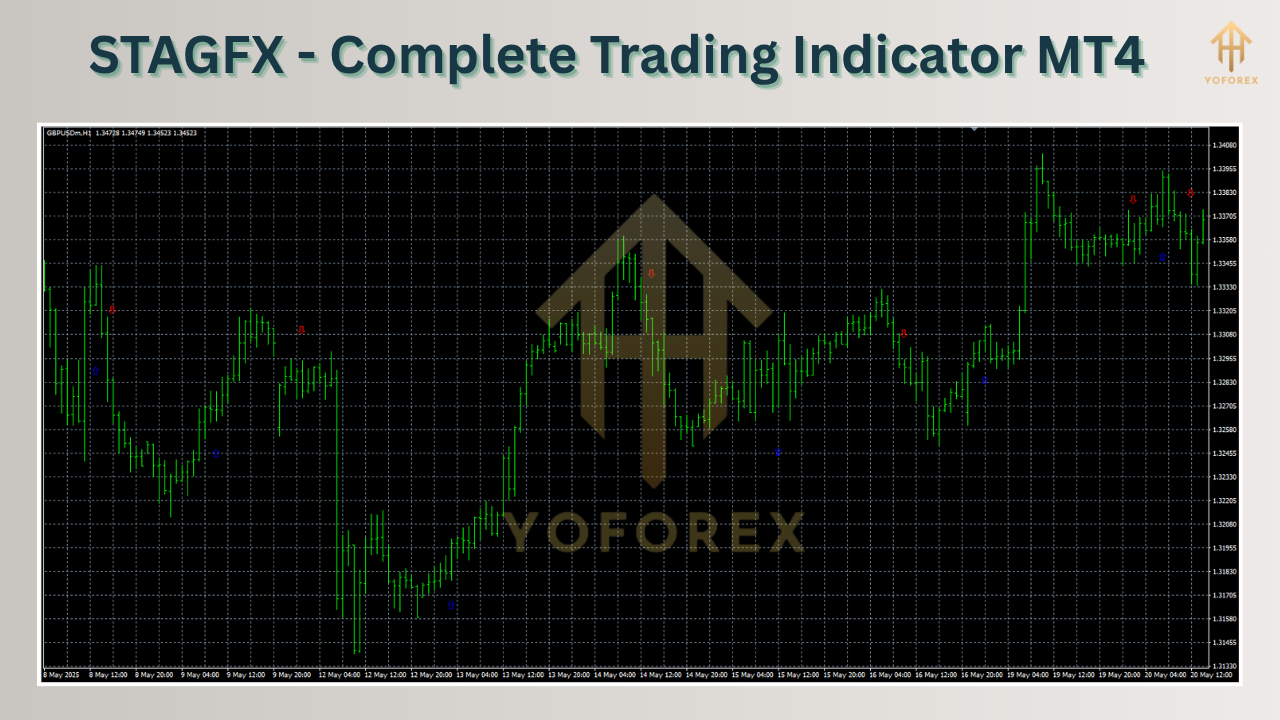
Installation & Setup Guide
Getting STAGFX up and running takes just a few minutes.
Step-by-step:
- Download the STAGFX Indicator file (link below) from ForexFactory.cc.
- Open your MetaTrader 4 platform.
- Click File > Open Data Folder > MQL4 > Indicators
- Paste the
.ex4or.mq4file there. - Restart MT4 and navigate to the Navigator panel (Ctrl+N).
- Drag & drop “STAGFX” onto your preferred chart.
- Load the default template or import the recommended settings.
Optional screenshot
Alt text: MT4 Navigator panel showing STAGFX loaded for EURUSD H1
You can customize the sensitivity, colors, and even toggle volume confirmations on/off from the indicator’s settings panel.
Why YoForex-Powered Tools Are a Gamechanger
Every tool under the YoForex umbrella goes through a serious build-test-deploy-optimize loop.
What does that mean for you?
- Lifetime Free Updates – We roll out bug fixes and enhancements regularly.
- Live Optimization – Our own traders test these tools on live accounts before releasing.
- 100% Transparency – No fluff, no mystery formulas. What you see is what you get.
- Fast, Free Support – We don’t ghost you when you have setup issues or strategy questions.
Wanna know more? Check our “About Us” section on ForexFactory.cc to see the team behind YoForex.
Support & Disclaimer
Got an issue with setup or optimization?
We got your back:
- WhatsApp Support → Click here
- Join our Telegram fam → Click here
Ask questions, share results, or even request mods and improvements. We listen.
Disclaimer: This is not financial advice. Past performance doesn’t guarantee future returns. Always test on demo before going live.
Call to Action – Your Next Step
What are you waiting for?
This is one of the most powerful, all-in-one trading indicators you’ll ever use—and it won’t cost you a dime. No license keys, no limitations, no BS.
Download your free STAGFX Indicator here
Set it up in minutes and start taking better trades, with more clarity, and less stress.
If you need support, just hit us up—we're literally just a message away.


Comments
No comments yet. Be the first to comment!
Leave a Comment