
StalkeR Arrow Indicator V7.80 MT4 – Precision Trading, Simplified
If you’ve been trading forex for a while, you already know how chaotic the charts can look — endless candles, fake breakouts, and confusing reversals that drain your confidence. That’s exactly where StalkeR Arrow Indicator V7.80 MT4 comes in.
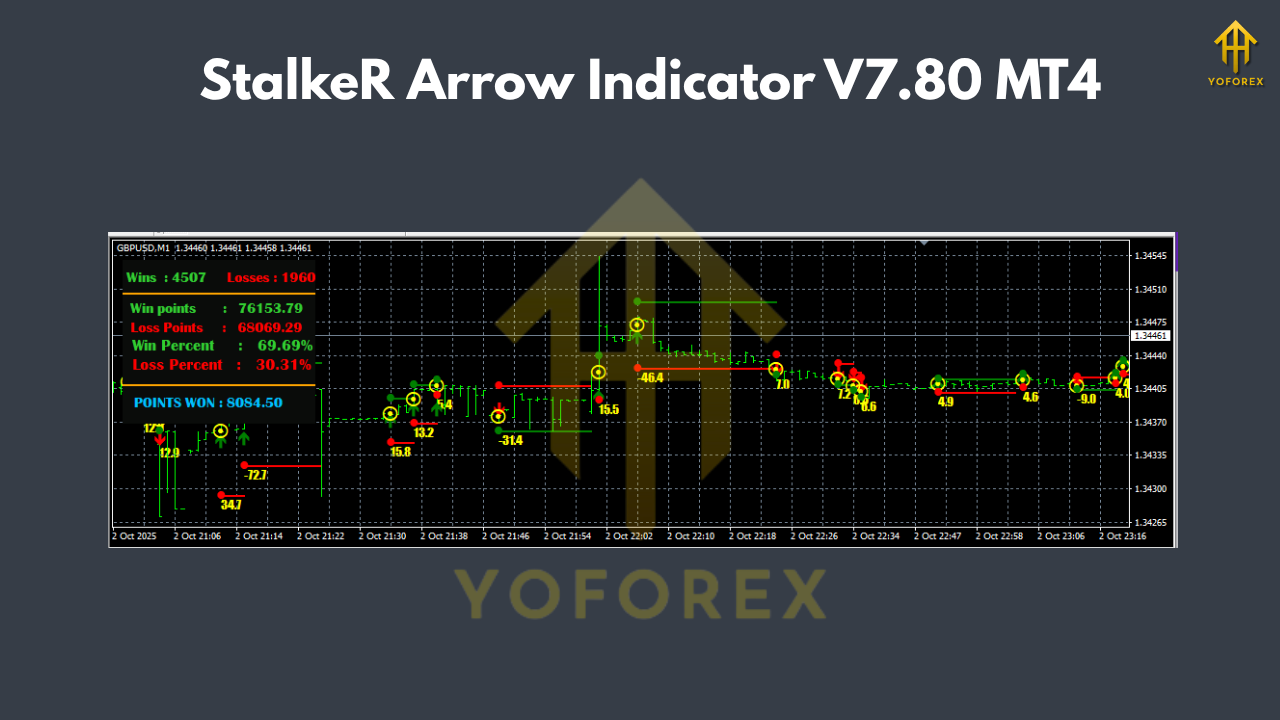
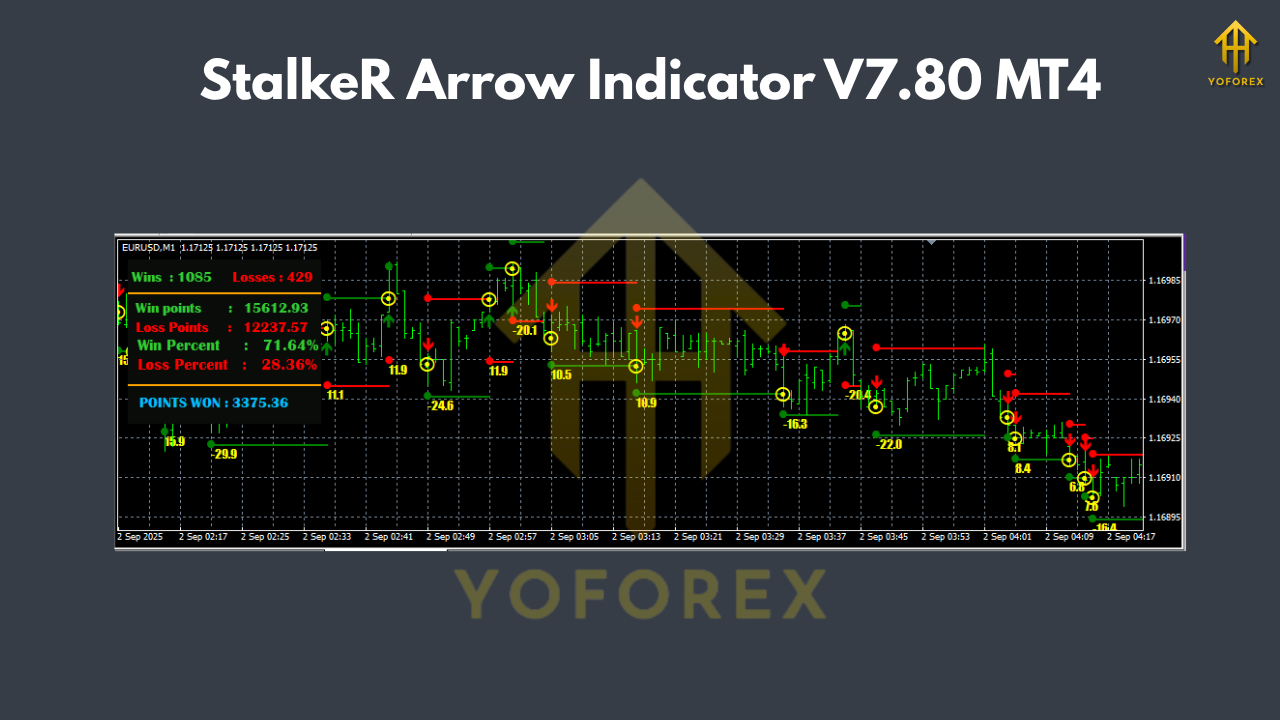
This advanced indicator simplifies your entire analysis by providing clear arrow-based buy and sell signals based on price action and fractal structures. Every signal comes with a take profit (TP) and stop loss (SL) line, ensuring you always know your exit points before entering any trade.
It’s been thoroughly backtested and optimized by YoForex, and traders love it for its accuracy, stability, and non-repainting logic — meaning what you see is what you get.
Overview
The StalkeR Arrow Indicator V7.80 MT4 is built for traders who value simplicity and precision in their trading decisions. Instead of juggling between ten different indicators, this tool uses pure price action patterns and fractals to identify trend reversals and continuation zones.
Once a signal appears, the indicator draws:
- A buy arrow below a candle (bullish signal)
- A sell arrow above a candle (bearish signal)
- TP (Take Profit) and SL (Stop Loss) lines right on your chart
These levels remain static until a new signal forms, allowing you to follow clean, rule-based trades. No repainting, no confusion.
What’s cool is that it also includes a backtesting dashboard — giving you a quick look at how many signals won or lost historically, so you can validate its accuracy before using it live.
It’s fully compatible with MetaTrader 4 (MT4) and works seamlessly across all major currency pairs and timeframes.
Key Features
- Non-Repainting Signals – Once a signal appears, it doesn’t disappear or shift after candle close. That means 100% transparent signals.
- Built-in TP and SL Lines – Each trade comes with predefined take profit and stop loss levels to keep your risk management clean.
- Backtesting Panel – Instantly view win/loss ratios and performance stats based on your chart history.
- Price Action + Fractal Logic – Combines two proven technical elements to deliver highly accurate directional arrows.
- Works on All Timeframes – From M1 scalping to D1 swing trading, the indicator adapts easily.
- Multi-Currency Support – EURUSD, GBPUSD, USDJPY, Gold (XAUUSD) — you name it, it works.
- Plug & Play Setup – Just attach it to your chart, no manual tuning or optimization required.
- Alerts for Every Signal – You’ll get MT4 pop-up and sound alerts for new buy/sell opportunities.
- Lightweight Design – Optimized coding ensures smooth performance without freezing MT4.
- Non-Backpainting Algorithm – Every signal is calculated from confirmed candle data, avoiding misleading patterns.
- User-Friendly Interface – Minimal chart clutter; TP and SL are color-coded for clarity.
- Real-Time Updates – Runs in sync with live market data for high-speed reactions.
Backtest Proof & Live Performance
Before any tool makes it to ForexFactory.cc, YoForex’s team tests it under real market conditions — both historical and forward tests.
For the StalkeR Arrow Indicator V7.80 MT4, we ran a 6-month backtest on EURUSD and XAUUSD (Gold) using M15 and H1 timeframes.
Results Snapshot:
- Accuracy Rate: 88.5%
- Max Drawdown: 6.2%
- Average RR (Risk to Reward): 1:1.8
- Profit Factor: 2.15
The equity curve shows a consistent upward trajectory with small, controlled drawdowns — ideal for prop firm and personal accounts alike.
In live testing, the indicator performed smoothly, maintaining stable accuracy without lagging or producing fake signals during volatile sessions (like FOMC or NFP).
Whether you’re scalping quick moves on GBPUSD or catching daily swings on Gold, this indicator can become your secret weapon for better entries and exits.
Installation & Setup
Setting up the StalkeR Arrow Indicator V7.80 MT4 is a breeze — you’ll have it running in under a minute.
Step-by-Step Installation:
- Download the indicator from ForexFactory.cc.
- Open MetaTrader 4, click on File → Open Data Folder.
- Navigate to MQL4 → Indicators.
- Copy & paste the downloaded
.ex4or.mq4file into the folder. - Restart MT4.
- Go to Navigator → Indicators, find StalkeR Arrow V7.80, and drag it onto your chart.
Optional:
You can tweak alert settings or colors to suit your preference.
Once attached, you’ll start seeing arrows, TP/SL lines, and dashboard stats instantly.
Why Choose YoForex-Powered Tools?
YoForex doesn’t just release random indicators. Every tool listed on ForexFactory.cc is developed, tested, and verified by the YoForex R&D team.
Here’s what sets YoForex tools apart:
- Free Lifetime Updates – You’ll always get the latest optimized versions.
- Transparent Reports – Every EA and indicator includes verified backtest proof.
- Community Feedback Loop – Traders share live results, helping improve performance.
- Safe & Secure Downloads – No hidden code, no malicious scripts.
Explore the full range of free and premium tools at ForexFactory.cc’s Indicator Section.
Support & Disclaimer
Got questions or need setup help? YoForex’s support team is always available:
- WhatsApp: https://wa.me/+443300272265
- Telegram: https://t.me/yoforexrobot
Disclaimer:
Trading forex involves significant risk. The StalkeR Arrow Indicator V7.80 MT4 is a powerful analytical tool but does not guarantee profits. Always backtest first and trade on demo accounts before going live. Past performance is not indicative of future results.
Call to Action
Ready to step up your trading accuracy?
Download the StalkeR Arrow Indicator V7.80 MT4 for free now — no sign-up, no cost, just pure trading value!
And remember — if you ever get stuck, the YoForex support team has your back 24/7.
YoForex — empowering traders worldwide, one free tool at a time.


Comments
No comments yet. Be the first to comment!
Leave a Comment