
Master Market Entries with the Valid Pullback Indicator V1.0 MT4
In the fast-paced world of forex trading, identifying high-probability entry points can make the difference between a winning and a losing trade. Pullbacks—temporary reversals against the prevailing trend—offer prime opportunities for traders to join an established move with minimal risk. However, distinguishing a genuine pullback from a minor market wobble is easier said than done. The Valid Pullback Indicator V1.0 for MetaTrader 4 (MT4) aims to simplify this process by providing clear, objective signals that pinpoint valid pullback zones. With this tool, both novice and experienced traders can enhance their timing, improve risk management, and ultimately increase their profitability.
Understanding Pullback Trading
A pullback is a short-term price movement against the main trend. In an uptrend, prices retreat from recent highs before resuming the upward trajectory; in a downtrend, prices bounce off recent lows before continuing downward. Traders use pullbacks to:
- Improve entry price: Enter closer to the trend’s origin, maximizing reward-to-risk ratios.
- Confirm trend strength: A shallow pullback followed by continuation often signals strong momentum.
- Reduce drawdown: Limiting initial risk by placing stops below pullback lows (or above highs in downtrends).
Yet pullback trading carries pitfalls. Entering too early can expose you to a deeper reversal, while entering too late may mean chasing faded momentum. Objective criteria are essential to filter out false pullbacks and capitalize only on valid retracements.
Introducing the Valid Pullback Indicator V1.0 for MT4
The Valid Pullback Indicator V1.0 MT4 is designed to automatically detect pullback patterns that meet predefined criteria for depth, duration, and momentum. It overlays visual markers—such as shaded zones and arrows—directly on your chart when a pullback qualifies as valid, based on technical conditions you can customize. The indicator is lightweight, compatible with all MT4 brokers, and optimized for minimal chart clutter. Key benefits include:
- Objective entry signals that eliminate guesswork.
- Customizable parameters to match any trading style or time frame.
- Real-time alerts via pop-up, email, or mobile push notifications.
- Compatibility with other trend-confirmation tools such as moving averages or oscillators.
By automating pullback detection, the indicator frees you from constantly monitoring charts, allowing you to focus on trade management and strategy refinement.
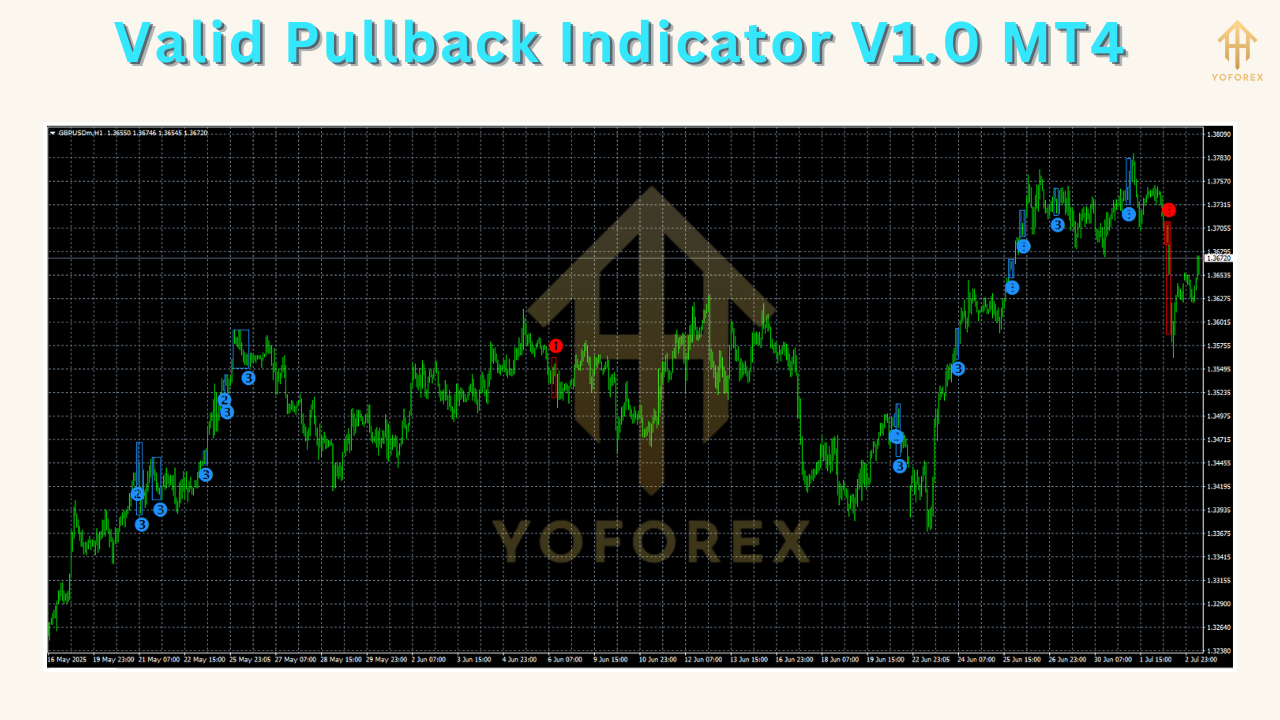
How the Indicator Works
At its core, the Valid Pullback Indicator employs a multi-step algorithm:
- Trend Identification: It calculates the prevailing trend using a user-defined moving average or directional range.
- Retracement Measurement: When price retraces against the trend, the indicator measures the depth (percentage of the trend move) and duration (number of bars) of the pullback.
- Momentum Filter: A momentum oscillator (e.g., RSI or MACD) confirms that the retracement is slowing before signaling a resumption.
- Zone Highlighting: If the pullback meets the minimum and maximum depth parameters, a shaded box appears around the zone, with entry and stop-loss lines clearly marked.
- Alert Generation: Upon zone completion, you receive an alert—ideal for traders who manage multiple charts or step away from the screen.
This blend of trend analysis, retracement metrics, and momentum confirmation ensures that only statistically significant pullbacks are highlighted. As price exits the pullback zone, the indicator reinforces your decision to enter with confidence.
Key Features
- Dynamic Pullback Zones: Automatically adjusts to evolving market conditions without manual trendline drawing.
- User-Defined Parameters: Set minimum retracement depth (e.g., 20–50%) and maximum duration (e.g., 3–8 bars) to filter noise.
- Multi-Timeframe Support: Apply the indicator on M1 through MN charts to suit scalping, day trading, or swing trading.
- Alert Options: Choose between visual (arrows/zones), audio, or email notifications.
- Trend Filter: Toggle moving average or Average Directional Index (ADX) filtering to ensure signals align with strong trends.
- Minimal Resource Usage: Engineered for efficient CPU performance, preventing platform lag even on multiple charts.
These features make the Valid Pullback Indicator a versatile companion for a wide range of trading approaches, from conservative trend followers to aggressive scalpers.
Installation and Setup
- Download the
ValidPullbackIndicator.ex4file from your broker or vendor portal. - Open MT4, then navigate to File → Open Data Folder.
- Copy the
.ex4file into the MQL4/Indicators directory. - Restart MT4 and locate “Valid Pullback Indicator V1.0” in the Navigator panel under Indicators.
- Drag the indicator onto your chart. A settings window will appear—adjust parameters as needed (see next section).
- Click OK. You should immediately see pullback zones drawn on historical price action and live price bars.
For optimal performance, apply the indicator to uncluttered charts. Remove unnecessary gridlines or indicators that might obscure zone shading.
Customizing Settings
The indicator’s inputs allow fine-tuning to reflect personal risk tolerance and market preferences:
- Trend Source: Select between Simple or Exponential Moving Average with a user-defined period (e.g., 50 EMA for swing trading).
- Retracement Depth (%): Set minimum (e.g., 20%) and maximum (e.g., 61.8%) values to capture meaningful pullbacks without trivial bounces.
- Retracement Duration (Bars): Define the lookback period (e.g., 5–10 bars) to control the maximum acceptable pullback length.
- Momentum Threshold: Choose an oscillator (RSI, MACD) and threshold (e.g., RSI < 30 for bullish pullbacks) to filter weak retracements.
- Alert Type: Enable pop-up, sound alert, email, or Push Notification for mobile MT4.
- Visual Styling: Adjust zone color opacity, arrow size, and line thickness to your chart theme.
Experiment with different combinations in a demo account to discover the settings that best align with your trading style and the currency pairs you trade.
Trading Strategies and Best Practices
To maximize the efficacy of the Valid Pullback Indicator:
- Combine with Trend Confirmation: Use a higher-timeframe moving average or trendline to verify that you are trading with the dominant trend.
- Risk-to-Reward Planning: Enter at the pullback zone boundary, place your stop-loss beyond the zone’s extreme, and target at least 1.5–2× your risk.
- Multiple Timeframe Alignment: Confirm pullbacks on both lower (entry) and higher (trend) timeframes for added conviction.
- Avoid Flat Markets: Disable the indicator when ADX is below 20, indicating weak or sideways trends.
- Partial Profit Booking: Consider scaling out of positions as price moves in your favor to lock in gains and reduce exposure.
- Maintain a Trading Journal: Record each signal’s parameters and outcome to refine your approach over time.
By integrating these techniques, you can convert the indicator’s raw signals into a structured trading plan that balances opportunity and discipline.
Risk Management and Tips
No indicator can guarantee profits; sound risk management remains paramount. Implement the following guidelines:
- Position Sizing: Never risk more than 1–2% of your account balance on a single trade.
- Avoid Overtrading: Limit signals to the most liquid sessions (e.g., London/New York overlap).
- Monitor News Events: Disable the indicator during major economic releases to avoid erratic price swings.
- Set Realistic Expectations: Aim for consistent small gains rather than occasional large wins.
- Review Performance Regularly: Analyze your trade history weekly to identify strengths and weaknesses.
Adhering to these principles will help you preserve capital and sustain long-term profitability even when the market environment shifts.
Conclusion and Next Steps
The Valid Pullback Indicator V1.0 MT4 offers a powerful, customizable framework for identifying high-probability pullback entries within prevailing trends. By combining trend filters, retracement metrics, and momentum confirmation, it empowers traders to make objective decisions and improve their reward-to-risk profile. To get started:
- Install the indicator on a demo account.
- Test various parameter settings across your preferred currency pairs.
- Develop a simple trading plan incorporating risk management rules.
- Transition to a live account once you achieve consistent demo performance.
Embrace the discipline of pullback trading with the Valid Pullback Indicator and take your forex strategy to the next level.


Comments
No comments yet. Be the first to comment!
Leave a Comment